Overview Visual VX+ WebServerVX+ run on multi-deviceTechnical reference VX+Create a variable in VX+Create database, script scenceCommand statment visual VX+Structure database tableOperations,conventions and rulersHTML & Javascript Code in VX+Editor program and compiler How do you do. Public webpage? Run a command line and return value Run a command line without return value Support Http:// and https:// protocols History application Visual X+ (VX+) Non Database:Simple webpage,Blog,Forum Security Database WebServer Admin Control Server from Remote

OVERVIEW VX+

Database WebServer VX+:
- It is new language program very simple, ease to learn, and is power to design database webserver.

- VX+ support simple web (static webpage - used demostration infomation)
and database web (dynamic webpage - used for office, company...).

- In database (dynamic web), it support to create a big server database (it uses xml structure data (metadata) on server and
data exchange between server and remote clients through data : text data, json data or dynamic webpage).

- Inside server:
    + VX+ support method to quikly created database, design forms, programming and running webserver.
    + It has functions (Math, Engineering, Database, Script, Macro, Tags ...) to program every all,
    + Some functions not return value (report, label, chart, sum,count, cell...). Theydo not calculate in expression.
    + Help to calculate, design edit form, report form, label form, macro tag.
    + It restrict programming.
    + it also support a window Server to monitoring remote clients log in/log out.


- Inside remote clients:
    + You can use tags (html code) to control database in server (append,edit,extract data).
    + And when to do it (append, edit, search infomasion...) ,
    + You can use any popular web browser and not need install any application in remote client.
    + From your choose webbrowser, you can input data and send to server through html tags Form or Ajax command.


See a Main Window VX+:
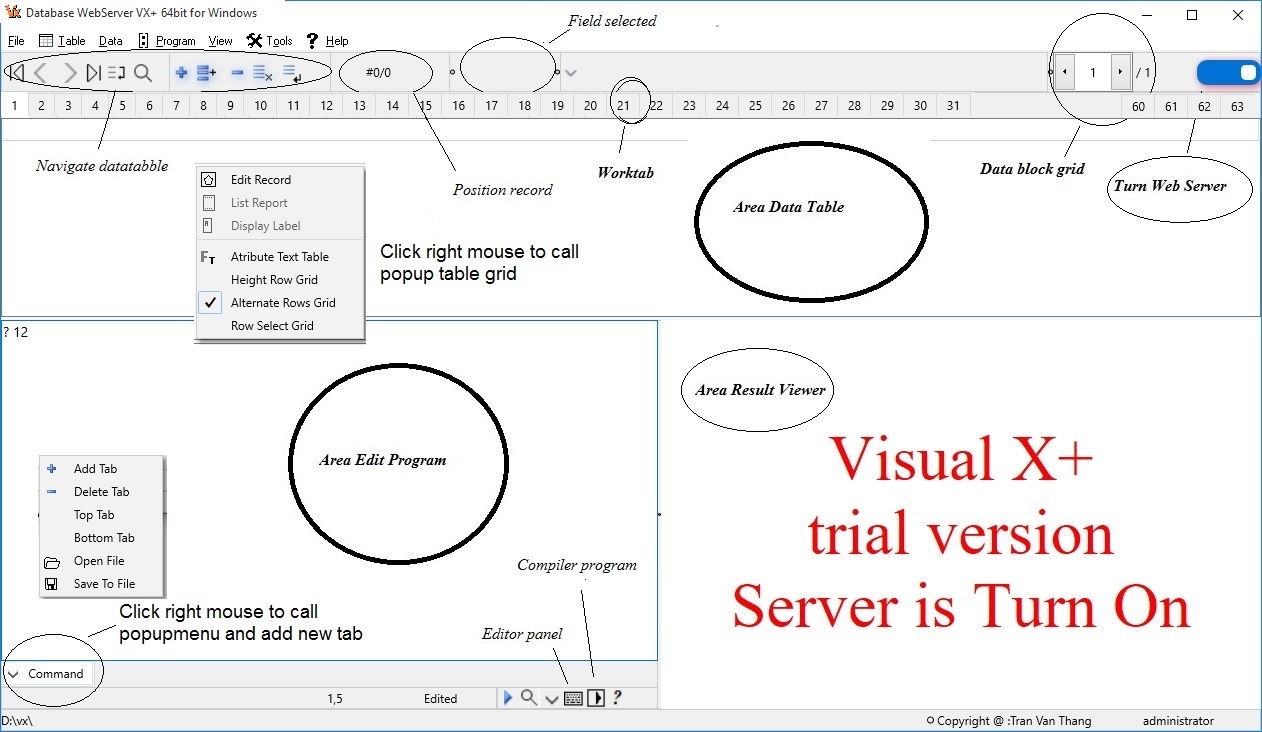
main Visual VX+

* Some rules In VX+:
WorkTable - Created from 1-64 tab in VX+ 64bit. It call WorkTable.
WorkTab - Every Table opened in a Tab called WorkTab (WorkTab(1)).
Field - Column table.
Record - Row table.


See more user guide VX+


PLATFORM

- VX+ can run on Multi-Device platform ... (Now run on Windows 64bit...).
- When public, you connect to internet, with static domain IP .
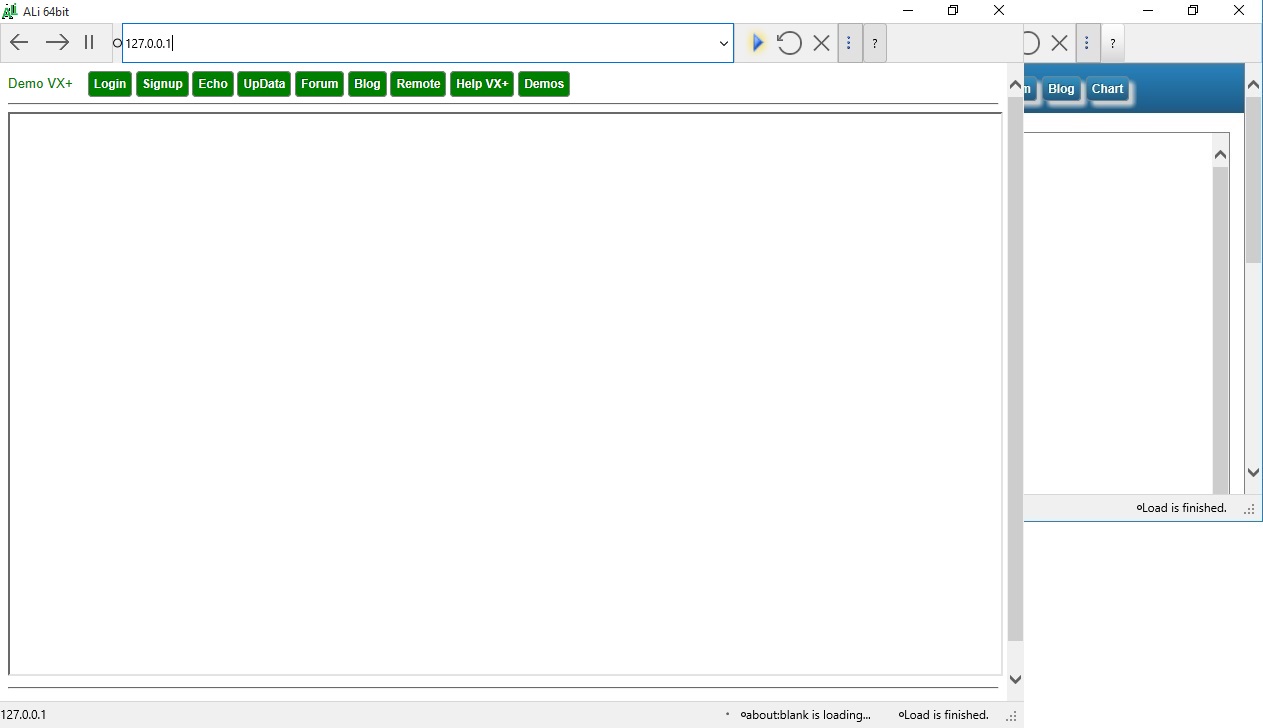
- To trial and debug, you connect to localhost IP: 127.0.0.1
- Inside remote client, you need run:
    + Run ALi web browser.
    + Run IE. Version : 11 and over (Need turn on Enable - Active Scripting. Internet Option/Security/Custom level.../Scripting/Active Scripting).
    + Run Other Webbrowser (Google chrome, Firefox...).
    + Username is characters a-z or number 0-9 or character _ , maxlenght 15.
    + Password is characters a-z or number 0-9 or character _ , maxlenght 10.
    + system username: server,admin.


- VX+ trial run on this server computer with IP: 127.0.0.1

demo IP 127.0.0.1


TECHNICAL

Technical reference:
- In fact, classfication database: the structure and none structure.
- VX is structure data and it can embed data none structure in this structure. This is, VX+ is very power.
- One a database is a table.
- Max dataset Table open at time : 64 tables in VX+ 64bit. Note, now VX+ 32bit not support.
- Max size of record unlimited character.
- Max character string 255 character.
- One database table created is two componet file and they are same name:
    + One memory dataset is a xml metadata database file (.xml).
    + Second file (.cdf) occupied commands, format forms, report forms or label forms and script scena, and other attributes (font,color, bold, italic...).

- Max form report designed in a table <=10 , every report max 16000 character.
- Max form label designed in a table <=10, every label max 16000 character.
- Max form input data in a table <=10 , every edit form max 16000 character.

- Max len name of field, variable, report, label, procedure, function <=20 character
- Max len number, field number : 1-20
- Max len character, field character : 1-254 character
- Max len memo, field memo : 1-69982 character
- Max len date, field date : 8 byte
- Max len logic, field logic : 1 byte
- Max procedure or function in a program <=127
- Max program,structure deep <=64
- Max a command len <=254 character
- Max program file editor open at time: 16 or more...
- Max size a program file editor: 69982 byte
- Max size a script code editor: 65500 byte
- Max variables in VX+ is 3000.
- Vx.exe run on windows 64 bit. It used for small dataset. Max memory < 2GB
- Vx64.exe run on windows 64 bit. It used for very big dataset. Max memory 4GB-16GB and more...


STRUCTURE

Structure data table
- Max Field in a Table (1-128) for structure. For unstructure in Memo field. This is power, what VX+ support.
- Max Record in a Table (1-2,147,483,648)

- Password (8-16)
- Script run in table - 65500 byte


STRUCTURE TABLE


Field TypeSymbol
Characture C (lenght=1-254 character)
NumberN (lenght=1-20)
DateTimeD (lenght=8)
LogicL (lenght=1)
MemoM (lenght=1-69982 character).
It is text (unstructure) or is hyperlinks or is webpage (semi-structure) or xml document or any objects html.


* Important you can calculate by TAG in this memo field, like: extract string, sum field memo by Tag...).
* Note, substitute macro {=exp} or <=exp> or macro function MACRO() not support in MEMO field.

Example:
webpage is look like:
<html>br> <head> head </head>
<boby>
Hello semi-structrure database
</body>
<foot>
End
</foot>
unstructure text with tags is look like:
<fieldname>... content ...</fieldname>, or <varname>.. content...</varname>

* Inside web server, you can use suntax to get value field:
- alias.fieldname
- alias->fieldname
fieldname is wrong
* Inside client, you only can use suntax to get value field:
- alias.fieldname
- alias->fieldname
* Or get variable value:
- varname


See how to create a Project in VX+

DATABASE

Create database
Every database VX+ is created by 2 file:
- One File (*.XML) is contains data.
- Other File (*.CDF) is contains format,structure,report,label,script...

Some time, you can create Password for database table. When modify structure this datatable, you need input password.

* Note. Created design database table is fisrt step and very importance.
See how to create a Project in VX+
After created project. You can open datatable,
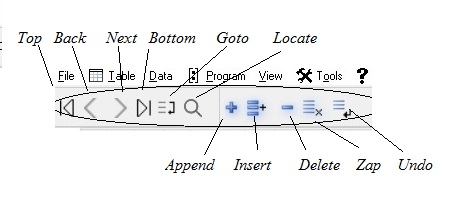
Choose menu [Table] to append, edit, delete record by Navigate data table:
Navigate data table


MEMORY

Memory variable. VX+ support 5 type;
- Characture type: C length 1-254 character.
- Number type : N lenght 1-20 character.
- DateTime type : D lenght 8 character.
- Logic type : L . It not used memory.
- Memo type : M . It not used memory, it a pointer.
    * Note, Memo type only is a point to field memo of current record (field memo contain : text, webpage, xml document, links, json...). if you skip record, when memo type variable point to Null value.
    * Because memo type is point, no value, it don't save value to disk when you use function SAVE().
    * Memo type variable created when you use expression Memo variable = field memo, like:
    var=demo.memo
    * Note, when database closed Memo Variable display message "Alias is closed". When you need open Data Table and asigned field memo to variable.
    * Note, you can't expression on variable memo or field memo.
    like: alias.fieldmemo1 + alias.fieldmemo2 is wrong.

- Dimmesion: varname(x), varname(x,y)
- Public [varname]
- Private [varname]

* Memory variable created when running VX+
- Create true logic variable on command : memvar=.T.
- Create string variable on command: memvar="12345" or memvar='12345'
- Create date variable on command: memvar=CTOD("01/01/2023")
- Create memo variable on command: memvar=alias.fieldname , fieldname is Memo field
- Number memory created on command editor. Like: memvar=12
- Memory created by command macro on runtime. Like: {@memvar=12}
- Memory created by function on runtime. Like: var('memvar=12')
They are asigned value 12 to memvar.

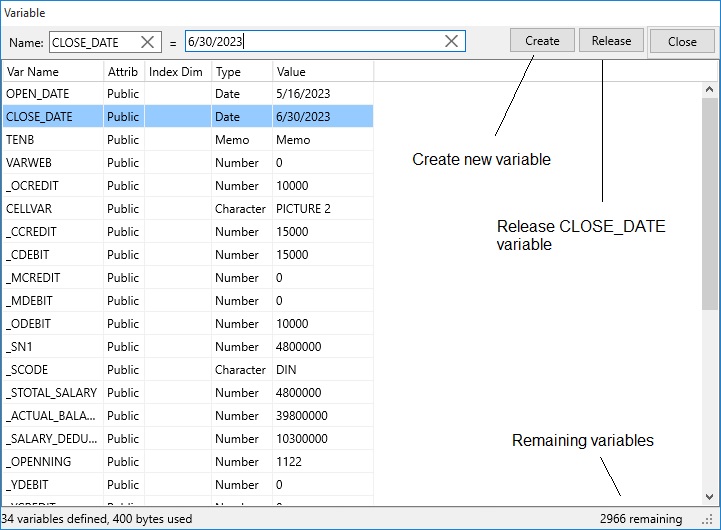
* Max total variable used in VX+ : 3000 - 6000 variables. You can set in configruration dialog.
If need, you can asigned variable is DIMENSION, in a dimension variable you have index array 3600 variables, too many!
* Importand, in VX+ the variable is searched first then the field name, and then command statement and last function VX+.
See bellow: It sorted by time created of variables, last created position at first row

Variable dialog


COMMAND STATMENT

Do program
CANCEL abort do program or command.

RETURN return called program.

Commands in VX+:

Uses substitution macro expression, example: {=[expression]} or <=[expression]>
var=' ? 1+2 '
&var
substitution value:
3

Uses macro command in line command: {@[command]}, example:
{@varname=2}
will assigned value 2 to varname


Substitution Macro expression:
{=[exp]}
or<=[exp]>

Example:
{=1+2}
or
? macro('{=1+2}')or<=1+2>

All return value: 3

* Note, in VX+ macro used to design REPORT, LABEL form.
* Note, don't uses macro and sustitude macro in memo field. * Do not used command macro nested, like: {='1+2 {=2+3}} is wrong.

= Run command line and not return result.

? Run command line and return result.
* Important, Don't use this command when turn on webserver. It don't run this command ? when turn on server.

?? Run command line and return result in current line.
* Important, Don't use this command when turn on webserver. It don't run this command ?? when turn on server.


Create and store value variable

Create new variable name VAR1 and it is assigned value string "Today", like:
var1='Today'
Example, Create one dimensional array : DIMENSION MEM(x)
DIMENSION x(3)
Example, Create two dimensional array : DIMENSION MEM(x,y)
DIMENSION x(3,4)

* Note max index array X*Y <=3600 . If Over VX+ message: Subscript out of bounds


Parameters of a program:
PARAMETERS x,y,z
Example, declare Private Variable:

PRIVATE x,y,z

Example, declare Public Variable:

PUBLIC x,y,z


WHILE
Description
Use the WHILE keyword to conditionally iterate a statement.
(statement) executes repeatedly until the value of (Expresssion Logic) is false.
The test takes place before executes.
Thus, if (Expresssion Logic) evaluates to false on the first pass, the LOOP does not execute.

WHILE (Expresssion Logic)
- statement...
- LOOP
- EXIT
ENDWHILE

The for statement implements an iterative loop.
ExpN2 is checked before the first entry into the block.
[statement] is executed repeatedly UNTIL the value of [varname] ExpN2.


FOR
Description
FOR varname=ExpN1 to ExpN2 step ExpN3
- statment...
- LOOP
- EXIT
ENDFOR
for x=1 to 10
? x
endfor


IF
Description
Use IF to implement a conditional statement.
IF [Expression Logic]
statmemt1
...
ELSE
statmemt2
...
ENDIF
* You also can use function IIF()


DOCASE
Description
DOCASE
CASE [Expression logic1]
statmemt 1
...
CASE [Expression logic1]
statmemt 2
...
OTHERWISE
other statmemt 3
...
ENDCASE


RUNTIME
Description
This a small program. It used to do something. It look like:
PROCEDURE/FUNCTION
PARAMETER x,y...
...
...
RETURN


RULERS

Convention language, Rules:

Alias Second name table. It is name worktab (character type) not number tab (number type)
FieldColumn Table or Fieldname (character type) or Fieldnumber (number type) of Table
RecordRow Table or Scope record of Table
Exp Expression
ExpLExpression logic
ExpDExpression date
ExpNExpression number
ExpCExpression character

Type of functions:
String function.
DateTime function.
Relation function.
Arithmetic function.
Trigonometric function.
Logical function.
Financial function.
Database function.

Type of Operators:

() Expression.

Arithmetic operators:
    **,^ Power
    *,/ Multiply,Divide
    +,- Plus, Minus

Logical operators:
    .NOT.()
    .AND.
    .OR.

Charactor operators:
    + Concatenation character.
    - Concatenation character. Move charater spaces to end of right.

Relational Operators:
    < Less than
    > Greater than
    = Equal to. If Exact turn On length s1 = length s2
    <>,# Not equal to
    <= Less than or equal to
    >= Greater than or equal to
    $ Compare, s1$s2: s2 contain in s1
    $'alias=name' a string contain in current record of Alias

See AT(),ATC()

Field of table:
    . Direct component selector. demo.number
    -> Indirect component selector. demo->number

    DateTime operators.
    +,- Plus, Minus

* Importand, because Memo type is a pointer, it don't operate in expression.

HTML Code VX+
To create dynamic web and remote control database in server. VX+ support some html code:
View example webpage on disk.

- <echo src=Wellcome to server;/>

after send command to server. you client receive string : Wellcome to server
- <a href=demo.htm;/>
return file demo.hml in server (.txt,.html,...).

- <src q?=2+1;/>
get value function : 2+1 in server and return 3 to client.

- <getdir dir=namedir; username=...; />

value of namedir: data/forum/blog

- namedir=data: get all file in folder WEBROOT/DOC, it used to put all files of database user in server.

- namedir=forum: get all file in folder WEBROOT/USERS/PUBLIC, it used to put all files of forum in server.

- namedir=blog: get all file in folder users/private/username, it used to put all files of blog in server.
* Note, when setting License for use is checked, you need input username exact.

It return links to file name.
- <delfile dir=namedir;filename=photo.gif; username=...;password=...;/>

Delete file photo.gif in folder DIR on server.
value of namedir: data/forum/blog

    + Where: namedir is blog. Username is Blog name and password is password of bloger. Only users blog can delete file in blog
    + Where: namedir is data. Username is name admin and password is admin password. Only admin can delete file in Webroot/doc.
    + Where: namedir is forum. Username is name admin and password is admin password. Only admin can delete file in Webroot/Users/Public.


- <create user=thang;/>

Create folder user name is thang on server.
- <getvar name=char;/>

Return value of variable or of fieldname or expression on server.
- <getvar name=demo.char;/>
Return value of fieldname (table demo.cdf) on server.

- <putvar name= ; value= ; password =username,admin password;;/>
Change value variable, variable created before an exist on server.
Password is admin.

- <getfield alias=demo;fieldname=char;/>
Return value of fieldname (table demo.cdf) at current record on server.
or
- <getvar name=demo.char;/>
Return value of fieldname (table demo.cdf) at current record on server.
- <getcell alias=demo;fieldname=char;q?=demo.char="V"/>
Return value of fieldname (table demo.cdf) at locate for condision on server.
or

- <append alias=demo;/>
Append end of file a blank record of table demo.cdf.

- <edit alias=demo;form=editdemo;/>
Return a webpage "demoedit". It embeded in file demo.cdf on server. View example on disk.

- <replace alias=demo;fieldname=char;type=char;value=PICTURE;/>
Replace on server fieldname char of demo Table (type is character) with PICTURE.

- <locate alias=demo;skip=1;/>
Move current record of demo on server to Next.
- <locate alias=demo;skip=-1;/>
Move current record of demo on server to Last.
- <locate alias=demo;record=top;/>
Move current record of demo on server to Top.
- <locate alias=demo;record=bottom;/>
Move current record of demo on server to Bottom.
- <locate alias=demo;record=1;q?=demo.char="VIDEO";/>
Move current record of demo on server to condition char="VIDEO", from record =1
- <locate alias=demo;record=3;q?=demo.char="VIDEO";/>
Move current record of demo on server to condition char="VIDEO", from record =3

- <select alias=demo;fieldlist=char,number;value?=demo.char;q?=demo.select=[quot]Xanh[quot];/>
Return list:

It using when need select option:
<select id="scity" >
<option value="s1"> hcm city</option>
</select>
if many field, value?=field1+","+field2+","+field...
value=field1,field2,fiel3...
option=field1,field2,fiel3...
And then, you can use javascript to extract, like:
var extract=value.match( /([^,]+)/g );
field1=extract[0]field2=extract[1]field3=extract[2]
- <report form=demotable;alias=demo;page=1;q?=demo.number>10;/>
Return a fisrt report form. It is a webpage.

- <label form=reclabel;alias=demo;q?=demo.number>10;/>
Return label form reclabel. It is a webpage.

- <chart alias=chart;style=bar;width=300;height=300;mark=no;legend=yes;/>
Return a hyperlink to file style Bar (It is graphics chart on server).

To do html code you can using 2 method, Example:

- Method 1:
<form name="fappend" method="GET" action="/VX-command" onsubmit= "sendRepl()" target="iframe";>
<input name="append" type="hidden" value="<append alias=demo;>";/>
<input name="char" type="hidden" title="<replace alias=demo;fieldname=char;type=char;value=" ;/>
<input name="action" tabindex="0" title="Post append to server" type="submit" value="Post Append"; />
</form>

- Method 2: VX+ support 2 new function javascript . To use, you need insert to head webpage.

<link rel="stylesheet" type="text/css" href="css/button.css" />
<link rel="stylesheet" type="text/css" href="css/textbox.css" />
See more css code used in VX+

<script src="js/jbasic.js" type="text/javascript"></script>>
<script src="js/jbasica.js" type="text/javascript"></script>

See more javascript code used in VX+

and use 3 function javascript, in below :

1. Function comands send from Form Input and return to idFrame

And

2. Function command send from Ajax and return to idOject (Div, Variable ....)
Example, html code report form: alias=demo, form=demotable, q?= demo.number>10
- reportA('demo','demotable','demo.number>10','demo');
Note: you need use define Object is name and id. Example:
<input name="command" id="command" type="text" value="example";/>
Not is :<input name="command" type="text" value="example";/>
Not is :<input id="command" type="text" value="example";/>

- In add, VX support two functions html:
+ Run an object script in script html code (it look like - do program).
SCRIPT(alias,ExpC1,ExpC2)

+ Extract an string from text html in Character field, character avariable or Memo field.
GETTAG(ExpC,opentag,closetag)


Program & language
Description
Editor Program & Compiler
Edit program is set of line command.
Main window VX+:
main window VX+
VX+ support 2 method:
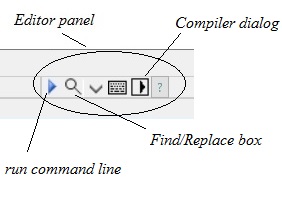
Edit panel:
editor panel

- 1 Method:
Program on VX platform, you can uses functions or scripts code supported by VX+:
    + To do command line, you click button [run]. Window display will show result.
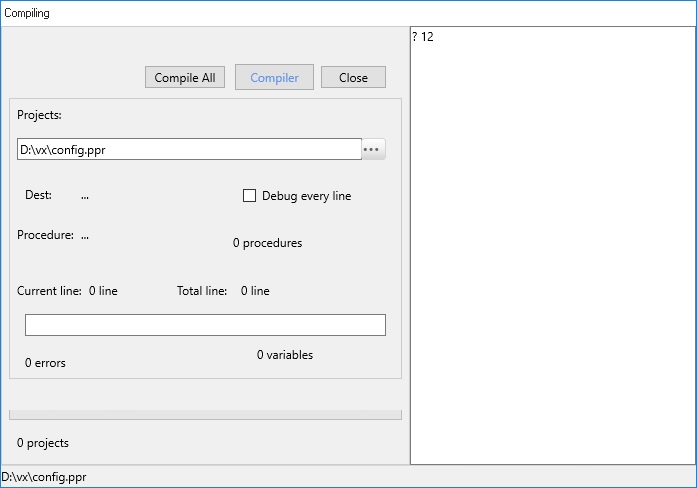
    + To compiler a program file extension (.prr). After compiler it has extention (.xpr).
Compiler dialog:

compiler dialog

You can open and editor at time over 10 program files (VX no limited programs open at time).
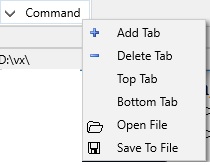
To open new program tab, you click right mouse button, when popupmenu show, choose item [Add Tab].
- You can run script function. It don't program code. Use script you embered code into structure of table

Add editor Tab

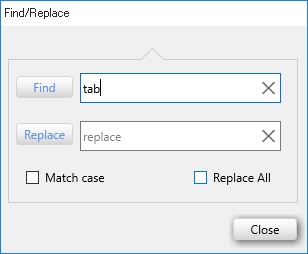
+ You can find/replace a string in editor, you click button [Find].
Find/Repalce dialog

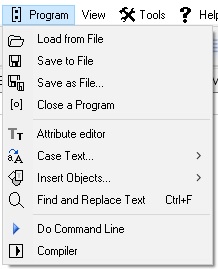
+ Or Choose main menu item [Program] when editor program:
Menu popup Program

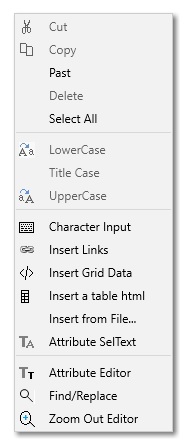
+ Or choose popupmenu item (click right mouse button) in area editor:

Menu popup Editor

- 2 Method: Used html code supported by VX+, to design webpage. You can use any editor to design webpage (like: microsoft NotePad, VX+).

See example design webpage
or
See more program editor used


? <Expr>
Description
Run a Command Line or Expression and return a value.

Suntax
? Expression

Example
? 'current worktab is : '+worktab()
current worktab is : 2
? 1+2
3


= <Expr>
Description
Run a Command Line or Expression and not return value.


Suntax
= Expression

Example
= 'current worktab is : '+worktab()

= 1+2


SSL/TLS Certificates
Description
SSL certificates are what enable websites to use HTTPS, which is more secure than HTTP.

SSL, more commonly called TLS, is a protocol for encrypting Internet traffic and verifying server identity.
Any website with an HTTPS web address uses SSL/TLS.

Why do websites need an SSL certificate?
A website needs an SSL certificate in order to keep user data secure, verify ownership of the website, prevent attackers from creating a fake version of the site, and gain user trust.

Encryption: SSL/TLS encryption is possible because of the public-private key pairing that SSL certificates facilitate.
Clients (such as web browsers) get the public key necessary to open a TLS connection from a server's SSL certificate.
Authentication: SSL certificates verify that a client is talking to the correct server that actually owns the domain.
This helps prevent domain spoofing and other kinds of attacks.

HTTPS: Most crucially for businesses, an SSL certificate is necessary for an HTTPS web address.
HTTPS is the secure form of HTTP, and HTTPS websites are websites that have their traffic encrypted by SSL/TLS.
In addition to securing user data in transit, HTTPS makes sites more trustworthy from a user's perspective.
Many users won't notice the difference between an http:// and an https:// web address, but most browsers tag HTTP sites as "not secure" in noticeable ways, attempting to provide incentive for switching to HTTPS and increasing security.

- VX+ version 1.0 only use http:// protocol
- VX+ version 2.0 support all http:// and https:// protocols.
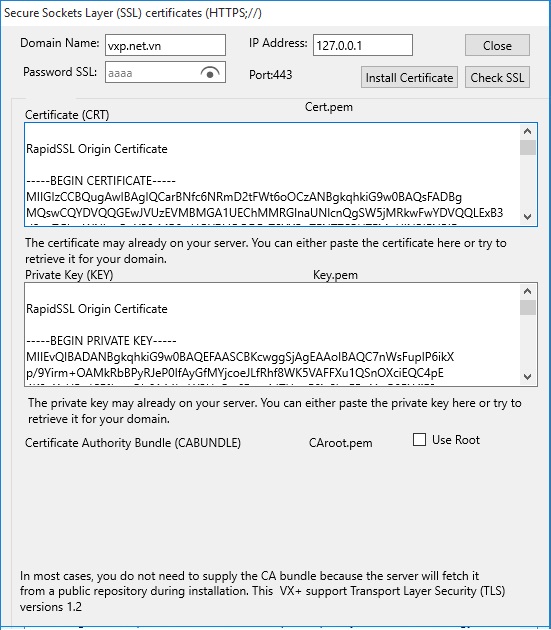
To setting SSL choose [config/Setting SSL] from Config Dialog to call SSL dialog:

setting SSL protocol
* Note, Example you registered:- IP:123.20.10.16- Domain Name: vxp.net.vn: Domain Name : Prospects and Consequences: -------------------------------------------------------: Dynamic IP : http://123.20.10.16 ... Dynamic server internet fee VNPT (when turn on/off MODEM IP chaged): Static IP : http://123.20.10.16 : Static server internet fee VNPT (when turn on/off MODEM IP no chage): SSL IP : https://123.20.10.16 : Not support: Domain name : http://vxp.net.vn : Server internet fee VNPT + fee domain name: SSL Domain name : https://vxp.net.vn : Server internet fee VNPT + fee domain name + fee by SSL Certificate (used bank, big company)-------------------------------------------------------------
- Dynamic IP is the cheapest. (used for smal company, personal...).When IP changed (after turn on/off Modem). It very safemode (Dynamic IP+Safemode).- SSL Domain Name: Fee is expensive. Install SLL complex. Need register...


History VX+
Description
- Database system XTF 1.0 for DOS was released in 1995 (now deprecated).
- XTF 3.0 run LAN for Windows XP was released in 2005 (now deprecated).
In 2015, XTF was suspended and XTF was developed on webserver with the new name Visual X+ (VX+). VX+ Used as a cross-platform Database Web Server.
- The first version Database webserver VX+ 1.0 is born in 03/2023.
Webserver Visual X+ (VX+) supports database programming and used webserver. VX+ version 1.0 is only supported for http:// protocol.
- The Database webserver VX+ version 2.0 is born in 04/2024. VX+ version 2.0 is supported for all http:// and https:// protocols.
- The Database webserver VX+ version 3.2 is born in 03/2025.
- The Database webserver VX+ version 3.3 is born in 06/2025.


Non Database Application
Description
VX+ support same no database application:
- Simple Webpage used create a webpage no database.

- PRIVATE Blog. It created in folder WEBROOT/USERS/PRIVATE (when access or upload to blog,
you use Username and Password of user (customer).
All users licence upload max size 10-10,000,000 byte and can to delete file.

to upload file photo.gif in blog thang and password is 123, WEBROOT/USERS/PRIVATE/THANG/ .
You run command:

<upload dir=blog;filename=photo.gif; username=thang;password=123;/>
to delete file photo.gif in blog thang and password is 123, WEBROOT/USERS/PRIVATE/THANG/photo.gif .
You run command:

<delfile dir=blog;filename=photo.gif; username=thang;password=123;/>
- PUBLIC FORUM. It created in folder WEBROOT/USERS/PUBLIC.
When access Public you need username and password of user.
When upload file to Public you need Admin Password (system).
All users and Admin licence to upload.
    + All users licence upload max size 10-10,000,000 byte and can't to delete file.
    + Admin licence upload max size 10-100,000,000 byte and can to delete file.
    + Upload file Trial Setup VX+ version 3.2 (setupvx_t32.zip) to this folder.


to delete file photo.gif in WEBROOT/PUBLIC/photo.gif. Admin athang and password is 234, you run command:

<delfile dir=forum;filename=photo.gif; username=athang;password=234;/>
- WEBROOT/DOC - All users and Admin licence to upload,read/write, maxsize file to upload 10-10000000 byte.
Only Admin licence to delete file in WEBOOT/DOC.

to delete file photo.gif in WEBROOT/DOC/photo.gif. Admin athang and password is 234, you run command:

<delfile dir=data;filename=photo.gif; username=athang;password=234;/>


Security Database WebServer
Description
Some method to recurity, like:
- From ISP. Support Internet.
- From Modem.Turn On/Off Firewall. Close port not used.
- Uses Windows Server 64bit or Windows 10 64bit over.
- Visual VX+ support.
- Uses application kill virus.- Delete applications not use.
Visual VX+ support remote recurity:
a> Not unsecurity: It used simple webpage, demo webpage...
Use Denied IP: Turn On/Off Denied IP, append IP to denied List.
Turn On save IP log when connect.

b> Security: Turn On Authenication Required. It show input username/password box in remote.
Username max 15 character, Password max 10 character.
- When choose Turn On Licence: admin or customer permision access.
+ When Licence is On and All Visits is Turn On (demo case) all visits promision access (any user/password).
- When choose Turn Off Licence: only admin permision access.
In this case, recurity by username and password. It can use Denied IP to promision access.

Importal, all this process writed to a login file in folder Weblog,like: login8-31-2024 8_11_57 PM.log- You can use IP not use Domain Name, Like:
123.12.20.2 (not remember)
vxp.net.vn


How do you do? Steps Create Application on Server
You can do 7 Steps :
- Step 1: Design plan in paper a structure database table is created by records (row) and fields (column).
- Step 2: Create a new project : Structure table, add Tradition Program (if need), Script scena, Input data form, report form, label form, attribute row and column.
- Step 3: Select type host and domain.
Example:
    + 127.0.0.1 webroot localhost
    or Public on web with fixed IP :
    + ... webroot
- Step 4: Design a webpage in directory webroot.
- Step 5: Testing and Run it. If OK
- Step 6: Public on web:
    + First open database tables.
    + Second, Turn Server On (choose [Tools/Config] - Checked "Turn Server").
    + Then, click on button [Run] web log ([Tools/Monitor Server] - [Run] web log).
- Step 7: Final, register domain for fixed IP (...).
You need open browser in remote client, press url: ... or IP: ..., to see.
- Open port modem:
See open port (nat) modem


Contact for us: http://vxp.net.vn
https://vxp.net.vn
vxp.net.vn


Email: vxp0803@gmail.com