Functions list
<.NOT.>
.NOT.(x)
Description
.not.(x) - operator is an alternative representation of the !operator (logical negation).
.NOT. returns true if its operand is false (.F.), and false if its operand is true (.T.).
Suntax
.NOT.(ExpL)
Example
? 3>4
.F.
? .NOT.(3>4)
.T.
Description
ABS Returns the absolute expression number value x.
Suntax
ABS(ExpN)
Example
? ABS(-10)
10.00
? ABS(10)
10.00
? ABS(5-15)
10.00
Description
Calculates the inverse cosine of a given number. It is Trigonometric function.
ACOS returns the inverse cosine of x. X must be between -1 and 1.
The return value is in the range [0..Pi], in radians.
Suntax
ACOS(ExpN)
Example
? RTOD(ACOS(-1))
180.00
? RTOD(ACOS(SQRT(2)/2))
45.00
Description
Calculates the inverse hyperbolic cosine of a given number. It is Trigonometric function.
ACOSH returns the inverse hyperbolic cosine of x. The value of x must be greater than or equal to 1.
Suntax
ACOSH(ExpN)
Example
? acosh(90)
5.19
Description
Calculates the inverse cotangent of a given number. It is Trigonometric function.
ACOT returns the inverse cotangent of x.
Suntax
ACOT(ExpN)
Example
? acot(2)
0.46
(radian)
Description
Calculates the inverse hyperbolic cotangent of a given number. It is Trigonometric function.
ACOTH returns the inverse hyperbolic cotangent of x.
Suntax
ACOTH(ExpN)
Example
? acoth(2)
0.55
Description
Calculates the inverse cosecant of a given number. It is Trigonometric function.
ACSC returns the inverse cosecant of x.
Suntax
ACSC(ExpN)
Example
? acsc(2)
0.52
Description
Calculates the inverse hyperbolic cosecant of a given number. It is Trigonometric function.
ACSC returns the inverse hyperbolic cosecant of x.
Suntax
ACSCH(ExpN)
Example
? acsch(2)
0.48
Description
ALIAS() - Return list alias of all table is openned.
ALIAS(x) - Return alias or worktab of database Table (worktab). Worktable have to Max 64 Worktab in VX+ 64 bit.
ALIAS(ExpC) - Return number worktab of name alias.
It is database function.
Suntax
ALIAS()
ALIAS(ExpN) - ExpN from 1 to Max WorkTab.
Example
Open 'user\salary' table in 1 worktab. After that :
? alias(1)
salary
This return alias name SALARY.
? alias('salary')
1
This return number worktab 1.
Open 'user\demo' table in 2 worktab. After that :
? alias()
SALARY,DEMO
or
? alias('demo')
2
or html code:
? html('
SALARY,DEMO
? html('
* Normal alias of database is filename of database table.
Description
Returns a new Character string without left or right spaces.
It is string function.
Suntax
ALLTRIM(ExpC)
Example
? 'L'+alltrim(' today ')+'R'
LtodayR
Description
Append blank record after last record of table x.
It is database function.
Suntax
APPENDREC(Exp)
Exp - ExpN number tab.
Exp - ExpC alias name.
Example
You open 'user\salary' table in 1 tab. After that :
? appendrec(1)
.T.
? appendrec('salary')
.T.
Html code, it can run inside remote client:
? html(<append alias=salary;/>)
Return order record appended.
Otherwase, return 0. when server not permision append mode or error data.
Description
Returns an encoding for the Unicode character set.
It is string function.
Suntax
ASC(ExpC)
Example
? asc('abc')
97
Description
Calculates the inverse secant of a given number. It is Trigonometric function.
ASEC returns the inverse secant of x.
Suntax
ASEC(ExpN)
Example
? asec(10)
1.47
Description
Calculates the inverse hyperbolic secant of a given number. It is Trigonometric function.
ASEC returns the inverse hyperbolic secant of x.
Suntax
ASECH(ExplN)
Example
? asech(0.5)
1.32
Description
Calculates the inverse sine of a given number. It is Trigonometric function.
ASIN returns the inverse sine of x. x must be between -1 and 1. The return value will be in the range [-Pi/2..Pi/2], in radians.
Suntax
ASIN(ExpN)
Example
? asin(0.5)
0.52
Description
Calculates the inverse hyperbolic sine of a given number. It is Trigonometric function.
ASINH returns the inverse hyperbolic sine of x.
Suntax
ASINH(ExpN)
Example
? asinh(0.5)
0.48
Description
Returns the index at which a specified y substring begins, from left position x.
It is String function.
Suntax
AT(ExpC1,ExpC2)
Example
? at('12ab','ab')
3
See compare operation two string $
? '12ab'$'ab'
.T.
Or see compare operation a string contain in current record of table DEMO $ 'alias=name'
? 'ab'$'alias=demo'
.F.
If string 'ab' not in current record.
? '#ab'$'alias=demo'
.T.
If string 'ab' and 'bc' in current record.
? 'ab & bc'$'alias=demo'
.T.
OR you can input same command
? demo.fieldname1$'ab'.AND.demo.fieldname2$'bc'
.T.
If string 'ab' or string 'bc' in current record.
? 'ab | bc'$'alias=demo'
.T.
OR you can input same command
? demo.fieldname1$'ab'.OR.demo.fieldname2$'bc'
.T.
This operation $'alias=name' very good, if a table has many fields you can forget .
* Note, sometime, any unicode character see like, but they unicode code is different. Like beelow example:,
? 'trần'='trần'
.F.
Look like, this expression is same:
But, it return false value, because, unicode character is different.
? asc('ầ')
226 + 768
It character is created from two character 'â' and symbol character 768.
? asc('ầ')
7847
It character is created from one character 7847.
Description
calculates the arc tangent of a given number. ATAN return a value in the range [-Pi/2 to Pi/2].It is Trigonometric function.
Suntax
ATAN(ExpN)
Example
? atan(50)
1.55
Description
Calculates the inverse hyperbolic tangent of a given number. It is Trigonometric function.
ATANH returns the inverse hyperbolic tangent of x. The value of x must be between -1 and 1 (inclusive).
Suntax
ATANH(ExpN)
Example
? atanh(0.5)
0.55
Description
Returns the index at which a specified y substring begins, from left position x and without case sensitivity.
It is string function.
Suntax
ATC(ExpC1,ExpC2)
ExpC1 is character or memo type.
Example
? atc('12Ab','ab')
3
Description
Calculates the arctangent angle and quadrant of a given number. It is Trigonometric function.
ATAN2 calculates ATAN(y/x), and returns an angle in the correct quadrant. The values of x and y must be between –264 and 264. The return value is from -Pi to Pi radians.
Suntax
ATN2(x,y)
Example
? atn2(150,20)
1.44
Description
Returns the average of the absolute deviations of data points from their mean.
AVEDEV is a measure of the variability in a data set.
It is financial function.
Suntax
AVEDEV(alias,Number field,Number record)
This is Financial function.
- alias is number type (1 to 32).
- alias is alias name of data table.
Number field are 1 to 128. Field is number type.
Number record are 1 to 30 record for which you want the average of the absolute deviations.
Remarks: Avedev calculates on current tab.
Example
Open 'user\finance' table in 1 tab. After that :
Input in field Year1, from 1 record to 7 record:4 , 5 , 6 , 7 , 5, 4 , 3
? avedev('finance',2,7)
1.02
Description
Calculate average field of Table.
It is database function.
Suntax
AVERAGE(alias,Exp,ExpC)
Exp - ExpC is field name Character or ExpN is number field.
ExpC - Condition
Example
You open 'user\demo' table in 1 tab. After that :
? average(1,5,'')
or
? average('demo','number','')
84.4
Description
Is Exp1 between Exp2 and Exp3
Suntax
BETWEEN(Exp1,Exp1,Exp1)
Example
? between(3,2,4)
.T.
? between('b','a','c')
.T.
? between('a','b','c')
.F.
? between(ctod('31/12/2018'),ctod('31/12/2019'),ctod('31/12/2019'))
.T.
Description
Convert binary to number or hex
Suntax
BINARY(ExpC,ExpN)
Example
? binary('01010101',2)
85
? binary('01010101',1)
0x00000055
Description
Current record is begin of file (table).
It is database function.
Suntax
BOF(alias)
Example
Open 'user\demo' in worktab 1.
? bof(1)
.F.
? bof('demo')
.F.
Description
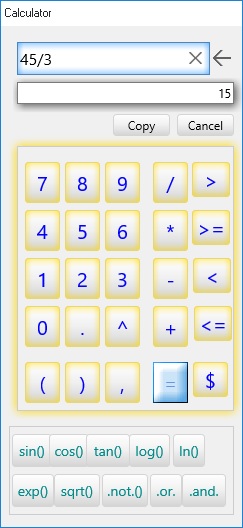
Call calculator dialog
Calculates formula VX+ or formula in field of table
Suntax
CALCULATOR()
CALCULATOR(ExpC)
CALCULATOR(alias,ExpC)
Where ExpC is Fieldname of alias. If ExpC = alias.fieldname is wrong. If ExpC = Fieldname is true.
CALCULATOR(alias,ExpC,ExpN)
Example
Calculates formula: 1+2+3
? calculator('=1+2+3')
6
Calculates formula field (example : =1+2+3 , it input and embed in formular field when you created project) in cureent record of alias table
Open 'user\demo' in worktab 1.
? calculator('demo','number')
6
Replace all record of field number with formula: 1+2+3
? replace('demo','number','=calculator("demo","number") ','=recno("demo")>0',1)
This action will replcae all record of field NUMBER with 6
return formula field NUMBER:
? calculator('demo','number',0)
=1+2+3
* Note:
? calculator()
to call Calculator Dialog:
CHART(x,y,z)
Description
Return link to chart
Suntax
CHART(alias,ExpC1,ExpC2,ExpN)
ExpC1 - Condition for Locate first record to begin draw.
ExpC2 - Html code.
* Now VX++ support 7 style chart (LINE,BAR,HBAR,AREA,POINT,PIE,FLINE)
ExpN - Start number record .
Max series of Chart is 10
Max number field of chart is 120
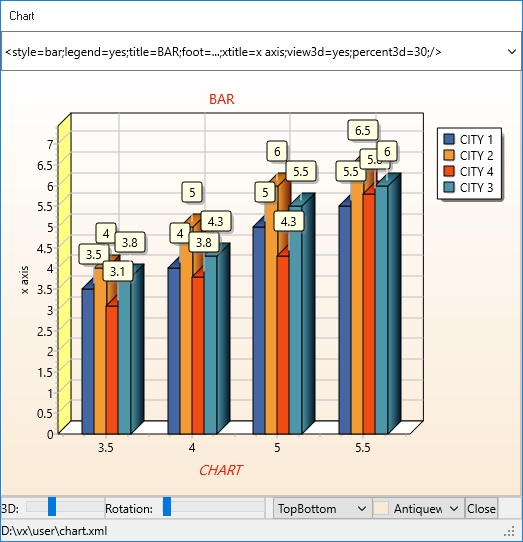
You can see chart dialog in main menu: Data/Chart/...
Example
? open(1,'user\chart','chart')
show bar chart.
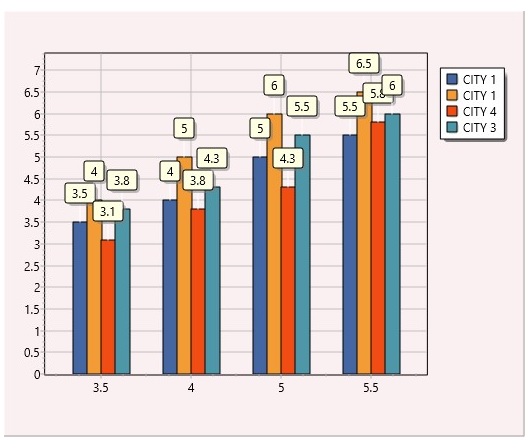
? chart(1,'','<style=bar;width=300;height=300;mark=yes;legend=yes;/>')
Html code, it can run inside remote client:
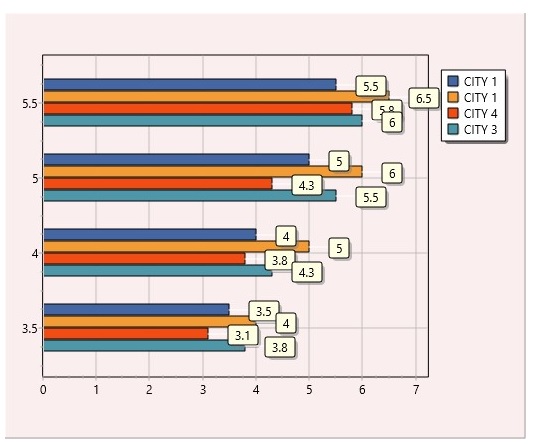
? html('<chart alias=chart;style=hbar;width=300;height=300;mark=yes;legend=yes;record=1;/>')
or
? html('<chart alias=chart;style=hbar;width=300;height=300;mark=yes;legend=yes;record=1;q?=people="CITY 1";/>')
This show people of city 1.
Description
Return day of week. It is character string.
Suntax
CDOW(ExpD)
Example
? cdow(date())
Monday
Description
Rounds variables up toward positive infinity.
Call CEILING (as in ceiling) to obtain the lowest integer greater than or equal to x.
Suntax
CEILING(ExpN)
Example
? celling(-2.8)
-2
? celling(2.8)
3
celling(-1.0)
-1
Description
Return value of Table from row,col.
It is database function.
Suntax
CELL(alias,ExpN1,ExpN2,nameVar)
ExpN1 : number column(field) or fieldname of table
ExpN2 : number row(record) or a condition to locate of table
nameVar : If cell() display message is true .T. value nameVar created and asigned.
Example
Open 'user\demo' in worktab 1.
Return value of field (column 1) CHAR at row 1:
? cell(1,1,1,'namevar')
? cell('demo','char',1.'namevar')
? cell('demo','char','=recno("demo")=1','namevar')
.T.
Create nameVar and asigned value
Description
Convert number unicode to character unicode.
Suntax
CHR(ExpN)
Example
? chr(65)
A
? chr(258)
Ă
Description
Set display is empty. It clear main area result viewer or clear all viewer.
* Note, not suport from remote.
Suntax
CLEAR()
CLEAR("all")
Example
Clear main viewer:
? clear()
Clear all viewer:
? clear("all")
Description
- Close dataset is openning on worktab.
- And run Script between tag <foot> ... </foot>
It is database function.
Suntax
CLOSE(alias) - Close only an alias.
CLOSE() - Close all data table.
* Note, not suport from remote.
Example
Open 'user\salary' table in 1 tab. After that :
? close(1)
.T.
or
? close('salary')
.T.
* Note, if salary edited, if will create backup file salary.xmlb in disk.
Description
Return month of date.
It is dateTime function.
Suntax
CMONTH(ExpD)
Example
? cmonth(ctod('02/03/2019'))
February
Description
Calculator Combinations of a number
Suntax
COMBIN(ExpN1,ExpN2)
Example
? combin(8,2)
28
Description
Copy file x to file y
* Note, not suport from remote.
Suntax
COPYFILE(ExpC1,ExpC2)
Example
? copyfile('demo','demo1')
Description
Returns the correlation coefficient of the field1 and field2 cell ranges.
Use the correlation coefficient to determine the relationship between two properties.
Suntax
CORREL(alias,Number field1, Number field2, Numer record)
This is Financial function.
Number field1 are 1 to 128. Field is number type. It is a cell range of values
Number field2 is a second cell range of values.
Number record are 1 to 30 record for which you want the correl
Remarks: It calculates on current tab.
Example
Open 'user\finance' table in 1 tab. After that :
Input in field Year1, from 1 record to 5 record: 3,2,4,5,6
Input in field Year2, from 1 record to 5 record: 9,7,12,15,17
? correl('finance',2,3,5)
1
Description
Calculates the cosine of an angle. It is Trigonometric function.
COS returns the cosine of the angle x.
x is a real-type expression that represents an angle in radians.
Suntax
COS(ExpN)
Example
? COS(0)
1.00
? COS(PI())
-1.00
? COS(DTOR(90))
0.00
Description
Calculates the hyperbolic cosine of an angle. It is Trigonometric function.
Use the COSH to calculate the hyperbolic cosine of x.
Suntax
COSH(ExpN)
Example
? COSH(0)
1.00
? COSH(PI())
11.59
? COSH(DTOR(90))
2.51
Description
Calculates the cotangent of an angle. It is Trigonometric function.
Call COT to obtain the cotangent of x. The cotangent is calculated using the formula 1 / Tan(x).
Suntax
COT(ExpN)
Example
? cot(1)
0.64
Description
Calculates the cotangent of an angle.
Call COTAN to obtain the cotangent of x. The cotangent is calculated using the formula. 1 / Tan(x)
Note: Do not call Cotan with x = 0.
Suntax
COTAN(ExpN)
Example
? cotan(19)
1.54
Description
Calculates the hyperbolic cotangent of an angle. It is Trigonometric function.
Call COTH to obtain the hyperbolic cotangent of x, where x is an angle in Radians.
Suntax
COTH(ExpN)
Example
? coth(0.7)
1.65
Description
Count number record in table for condition. It is Database function.It return reccount value.
Suntax
COUNT(alias,ExpC,namevar)
Example
Open 'user\demo' in worktab 1.
? count('demo','','namevar')
5
After that, VX+ created new variable NAMEVAR.
? namevar
5
Description
Returns covariance, the average of the products of deviations for each data point pair.
Use covariance to determine the relationship between two data sets.
Suntax
COVAR(alias,,Number field1, Number field2, Number record)
This is Financial function.
Field1 is the first cell range of integers.
Field2 is the second cell range of integers.
Example
Open 'user\finance' table in 1 tab. After that :
Input in field Year1, from 1 record to 5 record: 3,2,4,5,6
Input in field Year2, from 1 record to 5 record: 9,7,12,15,17
? covar('finance',2,3,5)
5.2
Description
Returns the cosecant of an angle. It is Trigonometric function.
Use the CSC to calculate the cosecant of x, where x is an angle in radians.
Suntax
CSC(ExpN)
Example
? csc(0.97)
1.21
radian
Description
Returns the hyperbolic cosecant of an angle. It is Trigonometric function.
Use the CSCH to calculate the hyperbolic cosecant of x, where x is an angle in radians.
Suntax
CSCH(ExpN)
Example
? csch(1.21)
0.65
Description
Convert character string to date.
It is dateTime function.
Suntax
CTOD(ExpC)
Example
? ctod('03/02/2019')
3/2/2019
Description
x=1: Converts an angle measurement from cycles to degrees.
CycleToDeg converts angles measured in cycles y into degrees, where degrees = y * 360.
x=2 Converts an angle measurement from cycles y to grads.
CycleToGrad converts angles measured in cycles into grads.
x=3 Converts an angle measurement from cycles y to radians.
CycleToRad converts angles measured in cycles into radians, where
radians = 2pi * y
Suntax
CYCLE(ExpN1,ExpN2)
Example
? cycle(2,3)
12.57
Description
Return current date.
Date value is the number of days that have passed since December 30, 1899.
The fractional part of a Date value is the time of day.
The maximal correct date supported by Date values is limited to 12/31/9999 23:59:59:999.
- DATE()- DATE(format)
It is dateTime function.
Suntax
DATE() current date
DATE(ExpC) current date with format
Example
? date()
06/05/2019
M/d/yyyy
M/dd/yyyy
M/ddd/yyyy
M/dddd/yyyy
M/dddddd/yyyy
m/dd/yyyy
mm/dd/yyyy
mmm/dd/yyyy
mmmm/dd/yyyy
dd/mm/yyyy hh:nn:ss AM/PM
MM/dd/yyyy
yyyy/MM/dd
MM/dd/yy
dd/MMM/yy
Example
? date('dd/mm/yyyy')
05/06/2019
Description
Returns the day of date.
Suntax
DAY(ExpD)
Example
? day(ctod('02/03/2019'))
3
Description
Convert number to Binary or Hex
Suntax
DECIMAL(ExpN,ExpN,ExpN)
Example
? decimal(85,2,10)
0001010101
(binary)
? decimal(85,10,10)
0x0000000055
(hex)
Description
Decodes the encode data and returns the decoded data.
It is string function.
Suntax
DECODE(ExpC)
Example
? decode('abc& #7873;')
abcề
Description
Delete a file x.
If x is file database EX.CDF together it will delete EX.XML
* Note, not suport from remote.
Suntax
DELETEFILE(filename)
Example
? deletefile('e:\demo.txt')
? deletefile('e:\t6.cdf')
.T.
two file t6.cdf and t6.xml has deleted.
Description
DELETEREC(alias) - Delete all record in table.
DELETEREC(alias,condition) - Delete record for condition in table.
Suntax
DELETEREC(alias)
Example
Open 'user\demo' in worktab.
Delete all record
? deleteRec(1)
? deleteRec('demo')
.T.
? deleteRec('demo','=char="VIDEO" ')
* Note, importand you can't use this function in client remote.
Description
Calculates the depreciation of an asset using the double-declining balance method.
DoubleDecliningBalance determines accelerated depreciation values for an asset, given the initial cost, life expectancy, end value, and depreciation period.
It is financial function.
Suntax
DDB(Cost,Salvage, Life,Period);Cost - is the initial cost of the asset.Salvage - is the value at the end of the depreciation (sometimes called the salvage value of the asset).Life - is the number of periods over which the asset is being depreciated (sometimes called the useful life of the asset).Period - is the period for which you want to calculate the depreciation. Period must use the same units as life.
Example
? ddb(2400,300,10*360,1)
1.32
Description
Return number diskfree side server. In Byte.
Suntax
DISKFREE(ExpC)
drive is a character A,B,C,D...
Example
? diskfree('D')
12,888,888,888
* Note, when webserver is turn on, this function not support.
Description
Returns the Day Of Week represented.
It is dateTime function.
Suntax
DOW(ExpD)
Example
? dow(ctod('03/04/2019'))
1
Description
Convert Date to Character string.
It is dateTime function.
Suntax
DTOC(ExpD)
Example
? dtoc(ctod('03/04/2019'))
3/4/2019
Description
x=0: Returns the value of a degree measurement expressed in cycles y.
Use DegToCycle to convert angles expressed in degrees to the corresponding value in cycles.
x=1: Returns the value of a degree measurement expressed in grads y.
Use DegToGrad to convert angles expressed in degrees to the corresponding value in grads.
x=2: Returns the value of a degree measurement expressed in radians.
Use DegToRad to convert angles expressed in degrees to the corresponding value in radians, where
radians = degrees(pi/180).
It is Trigonometric function.
Suntax
DEGREE(ExpN,ExpN)
Example
? degree(10,0)
0.03
? degree(10,1)
11.11
? degree(10,2)
0.17
Description
Convert date to character string format YYYYMMDD. It used to index date field.
It is dateTime function.
Suntax
DTOS(ExpD)
Example
? dtos(ctod('01/01/2019'))
20190101
Description
EDIT(alias) - return list fiieldname of alias.
EDIT(alias,formedit) - Edit data in server from remote client. You can use any browser to edit.
It is database function.* Note, not suport from remote: =edit(...).
Suntax
EDIT(Alias)
EDIT(Alias,ExpC)
Example
? open(1,'user\demo')
? edit(alias)
default,editdemo
This is tow form edit lists embed in database.
or you can use function html:
? html('
default,editdemo
? edit(alias,ExpC)
It return webpage is format form embed in database.
Html code, it can run inside remote client:
? html('<edit form=editdemo;alias=demo;/>')
See more edit form, created and used it
Description
Encodes the input data x and returns the encoded data.
It is string function.
Suntax
ENCODE(ExpC)
Example
? encode('abcề')
abc &# 7873;
Description
Control current record is End Of File (eof).
It is database function.
Suntax
EOF(alias)
Example
Open 'user\demo' in wordtab 1.
? eof('demo')
.F.
Description
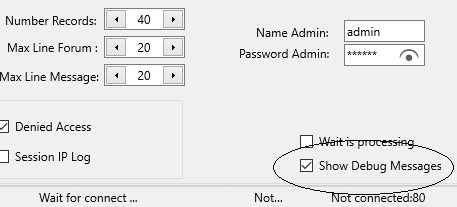
Return error code. Normal all messages show in area result viewer.
However, when web server mode is turn on all message in show in server dialog.
Suntax
ERROR()
Example
? error()
0 - is normal, otherwise is error.
Description
Exit VX+
Suntax
EXIT()
Example
? exit()
* Note, when webserver is turn on, this function not support.
* Note, not suport from remote.
Description
Returns the exponential of x.
Suntax
EXP(ExpN)
Example
? exp(0)
1.00
? exp(1)
2.72
Description
Returns the exponential distribution. Use EXPONDIST to model the time between events, such as how long an automated bank teller takes to deliver cash.
For example, you can use EXPONDIST to determine the probability that the process takes at most 1 minute.
It is financial function.
Suntax
EXPONDIST(x,lambda,cumulative)
x - is the value of the function.
Lambda - is the parameter value.
Cumulative - is a logical value that indicates which form of the exponential function to provide.
If cumulative is TRUE, EXPONDIST returns the cumulative distribution function;
if FALSE, it returns the probability density function.
Remarks
If x or lambda is nonnumeric, EXPONDIST returns the error value.
If x < 0, EXPONDIST returns the error value.
If lambda ≤ 0, EXPONDIST returns the error value.
The equation for the probability density function is:
Example
? expondist(0.2,10,0)
0.86
Description
Export on opening table to text delimited, json, cdf file
It is database function.
* Note, not suport from remote.
Suntax
EXPORT(alias,ExpC1,ExpC2,ExpC3,ExpC4)
ExpC1 - field list to export. "char;number". If "" all field exported.
ExpC2 - condition export. When ExpC2 = 0 copy only structure. If ExpC2="" copy all record.
ExpC3 - start from record number. Default start current record.
ExpC4 - (txt, json, cdf) file name to exported. Default ext file is .CDF .
Example
Copy records of alias DEMO (fields: CHAR and NUMBER), for RECNO('DEMO')>0 and start from 1 RECORD to text delimited file EXAMPLE.TXT
It text file used to send data to remote client.
? export('demo','char;number', "=recno('demo')>0",1,"example.txt")
* Records exported:
3
You can open this file by Microsoft NotePad and see:
PICTURE,200
AUDIO,80
MEMO,80
* Importand, when export MEMO field, all symbol eof line in MEMO field will replace by string tag <CRLF> .
* And when import, tag <CRLF> will replaced by symbol eof line.
Copy records of alias DEMO (fields: CHAR and NUMBER), for RECNO('DEMO')>0 and start from 1 RECORD to text delimited file EXAMPLE.JSON
It json file used to send data to remote client.
? export('demo',"char;number", "=recno('demo')>0",1,"example.json")
* Records exported:
3
You can open this file by Microsoft NotePad and see:
{"DEMO":[{"CHAR":"PICTURE","NUMBER":"200"},
{"CHAR":"AUDIO","NUMBER":"80"},{"CHAR":"MEMO","NUMBER":"80"}]}
Copy records of alias DEMO (fields: CHAR and NUMBER), for RECNO('DEMO')>0 and start from 1 RECORD to text delimited file EXAMPLE.CDF
* Note, when you copy to other file. Created file will deleted all information in structure file .cdf.
? export('demo',"char;number", "=recno('demo')>0",1,"example.cdf")
* Copy structure to file, when you copy to other file. Created file will deleted all information in structure file .cdf.
? export('demo',"char;number",0,1,"example")
Example.cdf created only Structure not data.
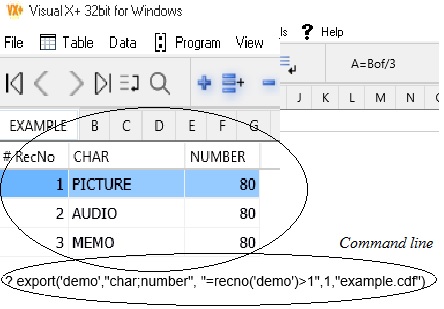
Other method, you also can copy by export dialog. See following export dialog:
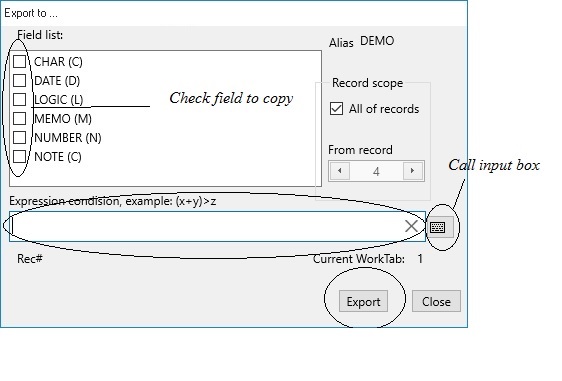
- You can export database to: text delimited file, json file, cdf file, xml metadata file.
- You can choose field name to export.
- You also set condition filter to copy data.
* Note, export() function some time used to export for select comboBox inside remote client.
See more: IMPORT(),COPYFILE()
Description
Return Factorial of a number
formular=x*x(-1)*x-2...
Suntax
FACT(ExpN)
Example
? fact(3)
6
Description
- Return fieldnumber or fieldname of table.
- Set fomular or format field into field of table
It is database function.
Suntax
FIELD(alias) - It return list fieldname of alias. It used for remote client.
FIELD(alias,ExpC) - ExpC fieldname of table. It return fieldnumber.
FIELD(alias,ExpN) - ExpC fieldnumber of table. It return fieldname.
FIELD(alias,ExpC,0) - ExpC fieldname of table. It return fieldtype (C/D/L/M/N).
- N : char
- D : date
- L : logic
- M : memo
- N : number
FIELD(alias,field,ExpC1,ExpC2) - Assign formula or format to field.
ExpC1 = FORMULA It set field formula
otherwise, It set format for field.
Example
Open 'user\demo' in worktab 1
? field('demo')
CHAR,DATE,LOGIC,MEMO,NUMBER,NOTE
or you can used function html:
? html('
? field('demo','date')
2
? field('demo',2)
DATE
? field('demo',1,'formula','=sin(2)')
This assign formula =SIN(2) to fielnumber 1.
? field('demo')
CHAR,DATE,LOGIC,MEMO,NUMBER,NOTE
This is list fieldname of alias DEMO.
Description
Return field count of a table
It is database function.
Suntax
FIELDCOUNT(alias)
Example
Open 'user\demo' in worktab 1
? fieldcount(1)
6
? fieldcount('demo')
6
Description
Return field zise of openning table
It is database function.
Suntax
FIELDSIZE(alias,ExpN)
Example
Open 'user\demo' in worktab 1
? fieldsize(1,1)
30
? fieldsize('demo',2)
30
Field CHAR has width 30 character.
Description
Tests whether a specified file x exists.File exists returns True if the file specified by FileName exists. If the file does not exist, FileExists returns False.
Suntax
FILE(ExpC)
Example
? file('user\salary.cdf')
.T.
* Note, when webserver is turn on, this function not support.
* Note, not suport from remote.
Description
This function calculates the Fisher transformation at x. The Fisher transformation is used to correct for bias in the Pearson product-moment correlation coefficient. It is used to calculate the chi-squared statistic .
It is financial function.
Suntax
FISHER(ExpN1,ExpN2)
- ExpN1 is values for the numerator.
- ExpN2 is denominator of the F-statistic.
Example
? fisher(0.75,0)
0.97
? fisher(0.75,1)
0.64
Description
Rounds variables toward negative infinity.
Call Floor to obtain the highest integer less than or equal to x. For example:
Suntax
FLOOR(ExpN)
Example
? floor(-2.8)
-3
? floor(2.8)
2
? floor(-1.0)
-1
Description
Calculates, or predicts, a future value by using existing values.
The predicted value is a y-value for a given x-value.
The known values are existing x-values and y-values, and the new value is predicted by using linear regression.
You can use this function to predict future sales, inventory requirements, or consumer trends.
It is financial function.
Suntax
FORECAST(alias,ExpN1,ExpN2,ExpN3,ExpN4)
ExpN1 is the data point for which you want to predict a value.
ExpN2 is the dependent array or range of data.
ExpN3 is the independent array or range of data.
ExpN4 is the x.Remarks
If x is nonnumeric, FORECAST returns the 0 value.
The equation for FORECAST is a+bx.
Example
Open 'user\finance' table in 1 tab. After that :
Input in field Year1, from 1 record to 5 record: 6 , 7 ,9 , 15 , 21
Input in field Year2, from 1 record to 5 record: 20 , 26 , 31 , 38 , 40
? forecast('finance',2,3,5,6)
1.3
Description
Indicates that a LOCATE or SEEK has been found. It return logic value.
It is database function.
Suntax
FOUND(alias)
Example
? found(1)
.T.
? found('demo')
.T.
Description
Calculates the future value of an investment.
FutureValue returns the future value of an investment of PresentValue where Payment is invested for NPeriods at the rate of Rate per period.
The PaymentTime parameter indicates whether the investment is an ordinary annuity or an annuity due (enter ptEndOfPeriod if payments are at the end of each period, ptStartOfPeriod if they are at the beginning).
It is financial function.
Suntax
FV(Rate,NPeriods,Payment,PresentValue,PaymentTime)
PaymentTime=0 - End, PaymentTime=1 - Start
Example
? fv(0.06/12,10, -200,-500,0)
2511.7
Description
Returns the geometric mean of an field or range of positive data. For example, you can use GEOMEAN to calculate average growth rate given compound interest with variable rates.
It is financial function.
Suntax
GEOMEAN(alias,field,number record)The arguments must be either numbers or names, arrays, or references that contain numbers.
If an array or reference argument contains text, logical values, or empty cells, those values are ignored; however, cells with the value zero are included.
If any data point ≤ 0, GEOMEAN returns the error value.
Example
? open(1,'user\finance','finance')
Input : 4,5 ,8 ,7 ,11 ,4 ,3 in field 2, then:
? geomean('finance',2,7)
5.48
Description
Extract the all value beteewn at tag and subtag.
- This function support unstructure database (text, document...) . It togetther with structure database is powerfull database VX.
- It is unstructure database function.
- Normally, properties of structure database created by formated order. Otherwise, properties of unstructure database created not order. It placed in any position.
Gettag function to used for unstructure database, it extract value bettwen opentag and closetag.
It is String function.
Suntax
GETTAG(expC,opentag,closetag)
GETTAG(expC,opentag,closetag, index)
- expC is field name or variable name.
* Note, OpenTag and CloseTag is math case.
- Opentag and Closetag, it is look like tags: <opentag> context <closetag>
- Opentag and Closetag, it is look like symbols, example : =,; ...
- Index is get a string from index. When index <1 or >Max Count, it return all value.
* Note, GetTag() is nest.
Example
? gettag("This is example: <hello>Wellcome to VX</hello> extract string from tag","<hello>","</hello>")
Wellcome to VX
? gettag("This is example: <hello>Hi!</hello> <hello>Wellcome to VX</hello> extract string from many tag","<hello>","</hello>")
Hi! Wellcome to VX
? gettag("This is example: <hello>Hi!</hello> <hello>Wellcome to VX</hello> extract string from first tag","<hello>","</hello>",1)
Hi!
Example Simple Personal profile:
profile1="<name>tran van thang</name><old>50</old><address>Dist 1, City.HoChiMinh; </address>
<tel>0903837xxx</tel><email>tranvanthang@....vn</email>"
Or you can write like:profile2="<name>tran van thang</name><tel>0903837xxx</tel><email>tranvanthang@....vn</email>
<address>Dist 1, City.HoChiMinh; </address><old>50</old>";
Or you can write like:profile3="<tel>0903837xxx</tel><email>tranvanthang@....vn</email>
<address>Dist 1, City.HoChiMinh; </address><old>50</old>
<name>tran van thang</name>";
When see it, you can write:(where profile is profile1 or profile2 or profile3)
? gettag(profile,"<name>","</name>")
? gettag(profile,"<old>","</old>")
? gettag(profile,"<address>","</address>")
? gettag(gettag(profile,"<address>","</address>"),"City.",";")
? gettag(profile,"<tel>","</tel>")
? gettag(profile,"<email>","</email>")>
Result:
tran van thang
50
Dist 1, City.HoChiMinh;
HoChiMinh
0903837xxx
tranvanthang@....vn
Example html code, it can run inside remote client::
? html("<gettag alias=demo;fieldname=memo;tag=name;/>")
Result:
tran van thang
Description
x=1: Converts grad measurements to cycles y.
GradToCycle converts angles measured in grads into cycles.
x=2: Converts grad measurements to degrees.
GradToDeg converts angles measured in grads into degrees.
x=3: Converts grad measurements to radians.
GradToRad converts angles measured in grads into radians, where
radians = grads(pi/200).
Trigonometric functions.
Suntax
GRAD(ExpN1,ExpN2)
Example
GradToCycle
? Grad(1,2)
Description
Returns the harmonic mean of a data set.
The harmonic mean is the reciprocal of the arithmetic mean of reciprocals.
It is financial function.
Suntax
HARMEAN(alias,field,row number)
Example
? open(1,'user\finance','finance')
Input : 4,5 ,8 ,7 ,11 ,4 ,3 in field 2, then:
? harmean('finance',2,7)
5.03
Description
Converts the given digit to the equivalent hexadecimal digit.
Suntax
HEX(ExpC,ExpN,ExpN)
Example
? hex('85',2,10)
0001010101
? hex('85',8,10)
125
? hex('85',10,10)
85
? hex('85',16,10)
0x0000000055
Description
Run html code. Importand a Function
* Html function can run in server VX+. Inside remote client you need used add javascript functions.
add javascript functions
* Note, this a unique function in VX+ can run all in server and in client.
* Warning: & replace with [amp], " repalce with [quot], % replace with [perc], + with [plus] when use htmlAjax function.
Suntax
HTML(ExpC)
ExpC - Html Tag.
Example
Open 'user\demo' in worktab 1. To append blank record into demo:
? open(1,'user\demo','demo')
1. None database Function:
Login server VX+, return false value if not register, return true value if registered:
? html( '<login username=...;password=...;/>')
See javascript : logToSer()
Echo of server. Control sesrver is allready:
? '<echo src=Wellcome to server;/>'
or
? html('<echo src=Wellcome to server;/>')
See javascript : helloVX()
Display a href :
? html( '<a href=function.htm;/>')
See javascript : loadHtmA()
Run a expression (1+2) of VX+ on server:
? html( ' < src q?=1+2; / > ')
See javascript : commandLineA()
3
Do a expression (1+2) of VX+ inside client, like:
<a onclick="commandAjax('<src q?=1+2;/>','demo')">Expression: 1+2</a>
Or calculate sum field number in table DEMO when CHAR="AUDIO".
? html( " < src q?=sum('demo','number','=char=[quot]AUDIO[quot]','') ; / > ")
To assigned variable in javascript, you use commandLineA():
=commandLineA('=sum([quot]demo[quot],[quot]number[quot]','=demo.char=[quot]AUDIO[quot],'')','divname');
=commandLineA('=sum([quot]demo[quot],[quot]number[quot]','=demo.char=[quot]AUDIO[quot],'')','varname');
* Note, =demo.char=[quot]AUDIO[quot] is =demo.char="AUDIO"
View all document in folder Public:
? html("<getdir dir=public;/>")
See javascript : getDir()
Delete file blog.htm in folder Private/username:
? html("<delfile dir=private\username;filename=blog.htm;/>")
See javascript : delf()
View video file
? html('<video width="150" height="150" controls><source src="demo/travel.mp4" type="video/mp4"> video </video>')
Create user Account.
? html("<create subdir=account\foldername;/>")
Get value of variable (varname) or of field (fieldname).
? html("<getvar name=varname;/>")
? html("<getvar name=alias.fieldname;/>")
See javascript : getVarA()
Get list names of memory variable, tables is open.
? html("<getlist memvar;/>")
See javascript : getMemA()
? html("<getlist table;/>")
See javascript : getTableA()
Run tag script command in private datatable from remote.
? html("<runtag alias=demo;tag=body;password=username,adminpass; />")
See javascript : runTagA()
Run sub tag script command in private datatable from remote.
? html("<runtag alias=demo;tag=body;sub=subscene;password=username,adminpass; />")
See javascript : runSubTagA()
Run a public command (it coding by admin used) from remote.
? html("<run program=name;parameters=...;password=username,adminpass; />")
See javascript : runPrgA()
2. Database Function:
Append blank record into demo database.
? html("<append alias=demo;/>")
.T.
See javascript : appendA()
Get field value at current position:
? html("<getfield alias=demo;fieldname=memo;namevar=var;/>")
or
? html("<getfield fieldname=demo.memo;namevar=var;/>")
Get field value for condition: namevar=value
? html("<getfield alias=demo;fieldname=memo;namevar=var;q?=char='Memo';/>")
or
See javascript : getFieldA()
Select field value of record to return a text delimited for tag <select> html :
? html("<select alias=province;fieldlist=code,province,area;value?=code+province;q?=area>=0;/>")
It return result:
<option value="24HA NOI CITY"> 24,HA NOI CITY,3300 </option>
<option value="28HO CHI MINH CITY"> 28,HO CHI MINH CITY,2000 </option>
<option value="272LONG AN"> 272,LONG AN ,4500 </option>
<option value="273TIEN GIANG"> 273,TIEN GIANG,2500 </option>
* Note, if count of option over 50 line, VX+ will break and return last option: More detail...
When, you need input condition for lookup more exact.
See javascript : selectA()
Select field value of record to return a json data :
? html("<json alias=province;fieldlist=code,province,area;q?=area>=0;/>")
It return result:
{"PROVINCE":[{"CODE":"24","PROVINCE":"HA NOI CITY","AREA":"3300"},{"CODE":"28","PROVINCE":"HO CHI MINH CITY","AREA":"2000"},{"CODE":"272","PROVINCE":"LONG AN ","AREA":"4500"},{"CODE":"273","PROVINCE":"TIEN GIANG","AREA":"2500"}]}
See javascript : tableJsonA()
Select field value of record to return a jtext data :
? html("<jtext alias=province;fieldlist=code,province,area;q?=area>=0;/>")
It return result:
See javascript : tableTextA()
Select field value of record to return a table data :
? html("<jtable alias=province;fieldlist=code,province,area;q?=area>=0;/>")
It return result:
PROVINCE
| CODE | PROVINCE | AREA |
|---|---|---|
| 24 | HA NOI CITY | 3300 |
| 28 | HO CHI MINH CITY | 2000 |
| 272 | LONG AN | 4500 |
| 273 | TIEN GIANG | 2500 |
* Note, if count of option over 1000 line, VX+ will break and return last option: More detail...
When, you need input condition for lookup more exact.
See javascript : tableDataA()
Replace field alias demo:
? html("<replace alias=demo;fieldname=char;type=char;value=Hello;/>")
? html("<replace alias=demo;fieldname=memo;type=text;value=This is a memo field;/>")
? html("<replace alias=demo;fieldname=date;type=date;value=02/02/2022;/>")
? html("<replace alias=demo;fieldname=logic;type=logic;value=true;/>")
? html("<replace alias=demo;fieldname=number;type=number;value=123;/>")
See javascript : replaceA()
* Note, very Importand, VX support input formular inside remote client, like following two expression:
Assigned string 123 to value:
value=123;
Assigned formula SIN(1) to value:
value?=sin(1);
However, you need assign (type=char, type=date, type=logic, type=number) by :
type=text;
Example:
replace fomular field: value 0.8 [sin(1)=0.8] will assigned for field number in server.
no uses formula:
? html("<replace alias=demo;fieldname=number;type=number;value=123;/>")
uses formula:
? html("<replace alias=demo;fieldname=number;type=text;value?=sin(1);/>")
* In client/server, you need LOCATE/APPEND record in server when used REPLACE.
Because, many people access data at time.
* Inside client you can not delete record in server. You can edit record or append new record in server.
Suntax for append a record in server (This tag only run when Monitoring server dialog you turn [Append] Checked and Write is Checked):
<form name="fappend" id="fappend" method="GET" action="/VX-command" onsubmit= "sendRepl()" target="...";>
<input name="append" id="append" type="hidden" value="
...
<input name="username" id="username" type="hidden";/>
<input name="password" id="password" type="hidden";/>
<input name="action" id="action" tabindex="0" title="Post append to server" type="submit" value="Post to Server"; />
</form>
Suntax for edit a record in server. To edit record in server, you need turn checkbox [Write] is Checked:
<form name="vinput" id="vinput" method="GET" >
Rec # :<input name="recno" id="recno" type="text" value="1";/>
Char : <input name="char" id="char" type="text" value="";/>
...
</form>
This function to go edit record.
locateRecNo(vinput.recno.value);
<a class="button" title="click Post edit Form" onclick="locateRecNo(vinput.recno.value);sendEdit('reshareIF')";>Post server-Form</a>
<a class="button" title="click Post edit Ajax command" onclick="locateRecNo(vinput.recno.value);sendEditA('demo')";>Post server-Ajax</a>
Report form RECEIVE of DEMO TABLE when field NUMBER>32.
? html("<report form=receive;q?=number>12;alias=demo;/>")
See javascript : reportA()
Label form RECEIVE of DEMO TABLE of current record.
? html("<label form=receive;alias=demo;record=4;/>")
See javascript : labelA()
Get table : fields of alias, edits of alias, reports of alias, labels of alias.
? html("<gettable alias= ;type=field;/>")
? html("<gettable alias= ;type=edit;/>")
? html("<gettable alias= ;type=report;/>")
? html("<gettable alias= ;type=label;/>")
See javascript : getTableA()
Extract tag in memo varname
? html("<gettag name=demo.memo;tag=address;/>")
See javascript : getTagA()
Locate record:
Go top alias demo:
? html('<locate alias=demo;record=top;/>')
Go to bottom alias demo:
? html('<locate alias=demo;record=bottom;/>')
Go to Record 4 alias demo:
? html('<locate alias=demo;record=3;/>')
? Skip next Record alias demo:
? html('<locate alias=demo;skip=1;/>')
Skip last Record alias demo:
? html('<locate alias=demo;skip=-1;/>')
Locate for condition (q?=) alias demo:
? html('<locate alias=demo;record=1;q?=demo.char=[quot]WEBPAGE[quot];/>')
See javascript : locateA()
See simple html code in browser to used functions VX+, example calculate: 1+2 inside remote client, it solved 3:
View result
VX+ functions:
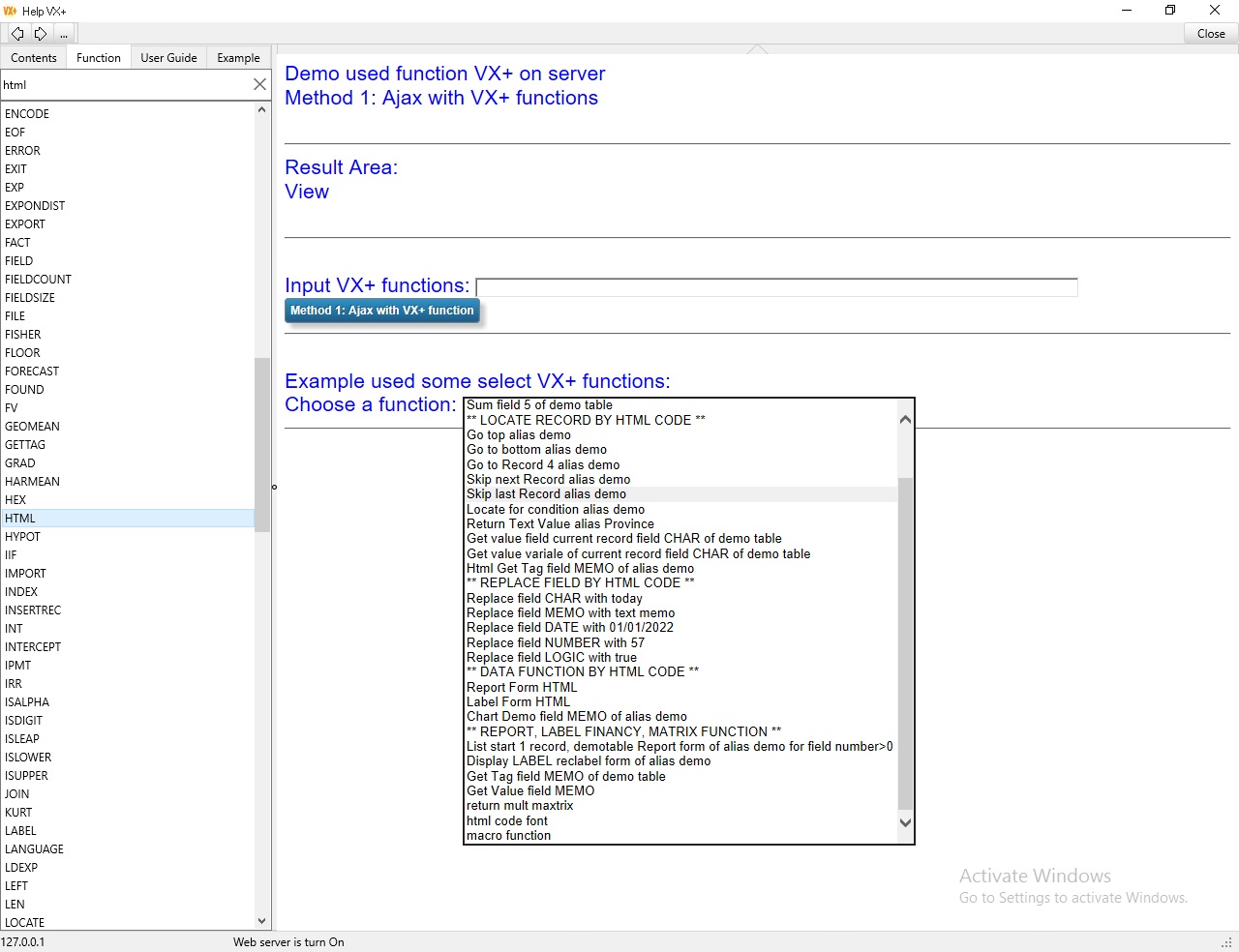
To see more used html function (add javascript functions) in side remote client
Example used Functions
Description
Calculates the length of the hypotenuse.
HYPOT returns the length of the hypotenuse of a right triangle. Specify the lengths of the sides adjacent to the right angle in x and y. Hypot uses the formula
Sqrt(x^2 + y^2)
Suntax
HYPOT(ExpN1,ExpN2)
Example
? Hypot(2,3)
3.61
Description
Return y or z if x is true.
Suntax
IIF(ExpL,Exp1,Exp2)
Example
? iif(3>2,'true','false')
true
Asigned macro A=3 , it unusually used when design report form
? IIF(3>2,macro('{@a=3}'),macro('{@a=2}'))
? a
3
Description
Import table from text delimited file (most use internet), json file, cdf file or xml metadata file.
It is database function.
Suntax
IMPORT(alias,ExpC1,ExpN1,ExpC2)
ExpC1 - field list. If ExpC1="" all field impord if field name of alias is same.
ExpN1 - number record import from filename. If ExpN1 = 0 will append all record.
ExpC2 - (txt,json,cdf,xml) filename to import
* Note, not suport from remote.
Example
? open(1,'user\demo','demo')
Append from file axample.txt 2 record.
? import('demo', ' ' ,2 , 'example.txt' )
Records import:
2
Import from data json file. Because, data json file is structrure data, when import it find same field name to append.
If not find field name it append blank.
? import('demo', ' ' , 2 , 'example.json' )
Records import:
2
? import('demo', ' ' , 2 , 'example.cdf' )
Records import:
2
Append from file axample.cdf all record.
? import('demo', 'char;number;' , 0 , 'example' )
All records import:
3
Append from file axample.xml all record.
? import('demo', 'char;number;' , 0 , 'example.xml' )
All records import:
3
* Note, file example.txt,example.json,example.cdf will same path of alias 'demo'.
Other method, you also can import by import dialog. See import dialog:
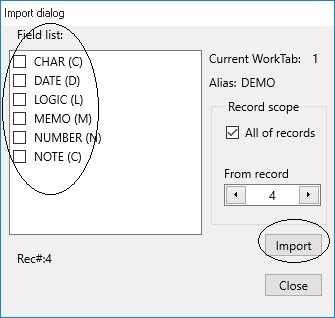
- You can import database to : text delimited file, json file, cds file, xml file.
- You can choose field name to import.
- You also set condition filter to copy data.
See more: EXPORT(),COPYFILE()
Description
Return index name in openning table.
Create index in openning table.
It is database function.
* Note, not suport from remote.
Suntax
INDEX(alias) - Get current index name.
INDEX(alias,1) - Get all index names created.
INDEX(alias,idxname,fieldlist,option) - Create index in openning table.
[fieldlist]: field1;field2;field3
[option] : default is ascending, /D is descending , /C is caseinsensitive
INDEX(alias,idxname,option) - Set index to idxname. After created idxname, you can set index to idxname:
INDEX(alias,idxname) - Close index name in openning table.
INDEX(alias,"") - Close all index name in openning table.
* Importand, dont' use INDEX in big data, because it very slowly.
* When use Edit Form you need close index. Because record number is changed.
* Restrict the use function AppendRec() when open INDEX.
Example
open 'user\demo' in worktab 1 and create index on CHAR field
? index('demo','char','char','/D')
.T.
? index(1)
CHAR
To open index:
? index('demo','CHAR',1)
.T.
Description
Insert record into table
It is database function.
Suntax
INSERTREC(alias)
Example
Open 'user\demo' in worktab 1.
? insertRec(1)
or
? insertRec('demo')
Description
Returns the integer part of a real number x.
Suntax
INT(ExpN)
Example
? int(12.5)
12.00
? int(-12.5)
-12.00
Description
Calculates the point at which a line will intersect the y-axis by using existing x-values and z-values.
The intercept point is based on a best-fit regression line plotted through the known x-values and known y-values.
Use the INTERCEPT function when you want to determine the value of the dependent variable when the independent variable is 0 (zero).
For example, you can use the INTERCEPT function to predict a metal's electrical resistance at 0°C when your data points were taken at room temperature and higher.
It is financial function.
Suntax
INTERCEPT(alias,field1,field2,number row)
Example
? open(1,'user\finance','finance')
Input : 2,3 ,9 ,1 ,8 in field 2
Input : 6,5 ,11 ,7 ,5 in field 3, then:
? intercept('finance',2,3,5)
0.05
Description
Calculates the interest portion of a loan payment.
Call InterestPayment to calculate the portion of a loan payment that reflects the interest.
Rate represents the fixed periodic interest rate.
Period identifies the payment period.
NPeriods is the number of periods of the loan.
PresentValue represents the amount borrowed (the principal).
FutureValue is the future value of the investment.
PaymentTime indicates whether the cash flows occur at the beginning or end of the period.
It is financial function.
Suntax
IPMT(Rate,Period,NPeriods,PresentValue,FutureValue,PaymentTime)
Example
? ipmt(0.10/12,1*3,3,8000,0,0)
-23
Description
Calculates the internal rate of return for an investment. InternalRateOfReturn determines the internal rate of return on an investment. It references an array that contains cash flow information and uses the supplied internal rate of return estimate to calculate results.
Before using this function, define an array containing expected cash flow amounts over a period of time. It is assumed that the amounts are received at regular intervals. Negative amounts are interpreted as cash outflows, and positive amounts as inflows. The first amount must be a negative number, to reflect the initial investment. The following amounts can all be the same for each time period, or they can be different (including a mixture of negatives, positives, or zeros).
Specify the estimated rate of return as the Guess parameter. Pass the array of expected cash flow amounts as the Field parameter. Number row parameter gives the index of the last entry in Table (one less than the number of entries).
It is financial function.
Suntax
IRR(alias,guess, field,number row)
Example
? open(1,'user\finance','finance')
Input : -70000,12000,15000 in field 2, then:
? irr('finance',-0.01,2,3)
-0.44
Description
Determines whether a first character is defined as alpha.
Suntax
ISALPHA(ExpC)
Example
? isalpha('a123')
.T.
? isalpha('123')
.F.
Description
Determines whether a first character is defined as digit.
Suntax
ISDIGIT(ExpC)
Example
? isdigit('123')
.T.
Description
Indicates whether a specified year is a leap year.
Suntax
ISLEAP(ExpD)
Example
? isleap(ctod('03/03/2020'))
.T.
Description
Determines whether a first character is defined as lower.
It is string function.
Suntax
ISLOWER(ExpC)
Example
? islower('lower')
.T.
Description
Determines whether a first character is defined as uppercase.
It is string function.
Suntax
ISUPPER(ExpC)
Example
? isupper('Upper')
.T.
Description
Join two table and create new table. Cross two matrix (table).
It is database function.
Note: dont use this function on server. it verry slowly.
Suntax
JOIN(alias,aliaswith,ExpC1,ExpC2,ExpC3,ExpC4)
ExpC1 - fieldname
ExpC2 - save to filename
ExpC3 - Condition
ExpC4 - INNER / LEFT OUTER / RIGHT OUTER / FULL OUTER - CROSS
It return number record joined.
Example
? open(1,'user\demo','demo')
? open(2,'user\matrix','matrix')
? join(1,2,"","example","","")
or
? join('demo','matrix',"","example","","")
Description
Returns the kurtosis of a data set. Kurtosis characterizes the relative peakedness or flatness of a distribution compared with the normal distribution. Positive kurtosis indicates a relatively peaked distribution.
Negative kurtosis indicates a relatively flat distribution.
Suntax
KURT(alias,field,number row)
Example
? open(1,'user\finance','finance')
Input : 3 ,4 ,5 ,2 ,3 ,4 ,5 ,6 ,4 ,7 in field 2, then:
? kurt('finance',2,10)
2.37
Description
Used for translating strings. Now VX+ support only english.
It is string function.
Suntax
LANGUAGEL(ExpC)
Example
? language('en')
* Note, not support in server.
Description
Calculates x times (2 to the power of P).
Ldexp returns x times (2 to the power of P).
Suntax
LDEXP(x,p)
Example
? ldexp(2,3)
16
Description
Return substr 0 position from left.
It is string function.
Suntax
LEFT(ExpC)
Example
? left('visual vx',3)
vis
Description
Returns the number of characters in a String s.
It is string function.
Suntax
LEN(ExpC)
Example
? len('3200')
4
? len('today')
5
Description
Locate record in datatab.
It is database function.
Suntax
LOCATE(Alias,ExpC,ExpN)
- Alias : Alias of Data Table.
- ExpC : Character Expression Condition.
- ExpN : Start Record of Data Table.
* Importand, RecNo is changered when you open INDEX.
Example
? locate('CHART2','=char="Q4"',1)
? locate('CHART2','="Q4"$"..."',1)
Locate all fieldname='Q4'
? locate('CHART2','="q4 & hochiminh"$"..."',1)
Locate record for condition : 'q4' in fieldname AND 'hochiminh' in fieldname2.
Or you can input same command:
? locate('CHART2','=fieldname1="Q4".AND.fieldname="HOCHIMINH"',1)
? locate('CHART2','="q4 | hochiminh"$"..."',1)
Locate record for condition : 'q4' in fieldname OR 'hochiminh' in fieldname2.
Or you can input same command:
? locate('CHART2','=fieldname1="Q4".OR.fieldname="HOCHIMINH"',1)
If located it return recno#. Othewase return 0.
See more: RECNO(),SKIP(),SEEK()
Description
Returns the natural logarithm of a real expression.
Suntax
LOG(ExpN)
Example
? LOG(1)
0.00
? LOG(EXP(2))
2.00
Description
Calculates log base 10.
LOG10 returns the log base 10 of x.
Suntax
LOG10(ExpN)
Example
? log10(10)
1.00
? log10(10^2)
2.00
Description
Calculates log base 2.
LOG2 returns the log base 2 of x.
Suntax
LOG2(ExpN)
Example
? log2(10)
3.32
Description
Calculates the log of x for a specified base.
LOGN returns the log y base Base of x.
Suntax
LOGN(ExpN1,ExpN2)
Example
? logn(2,10)
3.32
Description
Returns a lowercase version of character string.
It is string function.
Suntax
LOWER(ExpC)
Example
? lower('Visual VX+')
visual vx+
Description
Returns a new charater string without left spaces.
It is string function.
Suntax
LTRIM(ExpC)
Example
? 'L'+ltrim(' today ')+'R'
Ltoday R
Description
Macro function is a line command. Before running it susbtituted by other expresstion.
It macro used for design Label form or Report form or Calculator Field.
This function is usefull and interesting.
* Note, if memo field macro return value: Memo or memo.
* Note, don't uses macro and sustitude macro in memo field. * Note, don't uses many macro in a command line. Like: {=1+2} {=5+4} . It can over memory.
- memo : if it empty .
- Memo : if it not empty .
Suntax
MACRO(ExpC)
Example
? macro("{=2+3}")
5
? macro("{=memo}")
Memo
You can use substitution macro expression or macro command when design report form or label form or editor text:
- Or do macro expression, example: {=[expression]} or <=[expression]>
{=2+3}
substituted with value: 5
or you can use:
<=2+3>
substituted with value: 5
- Or do macro command in line command: {@[command]}, example:
{@varname=2}
will assigned value 2 to varname
or
var('varname=2')
Function VAR() will assigned value 2 to varname
- Or do substitution command:
var=' ? 2+3 '
&var
substituted with command
? 2+3 and return result:
5
* Note, If macro betteewn at tags <script> {=12} </script>. It not show.
See label form used function macro
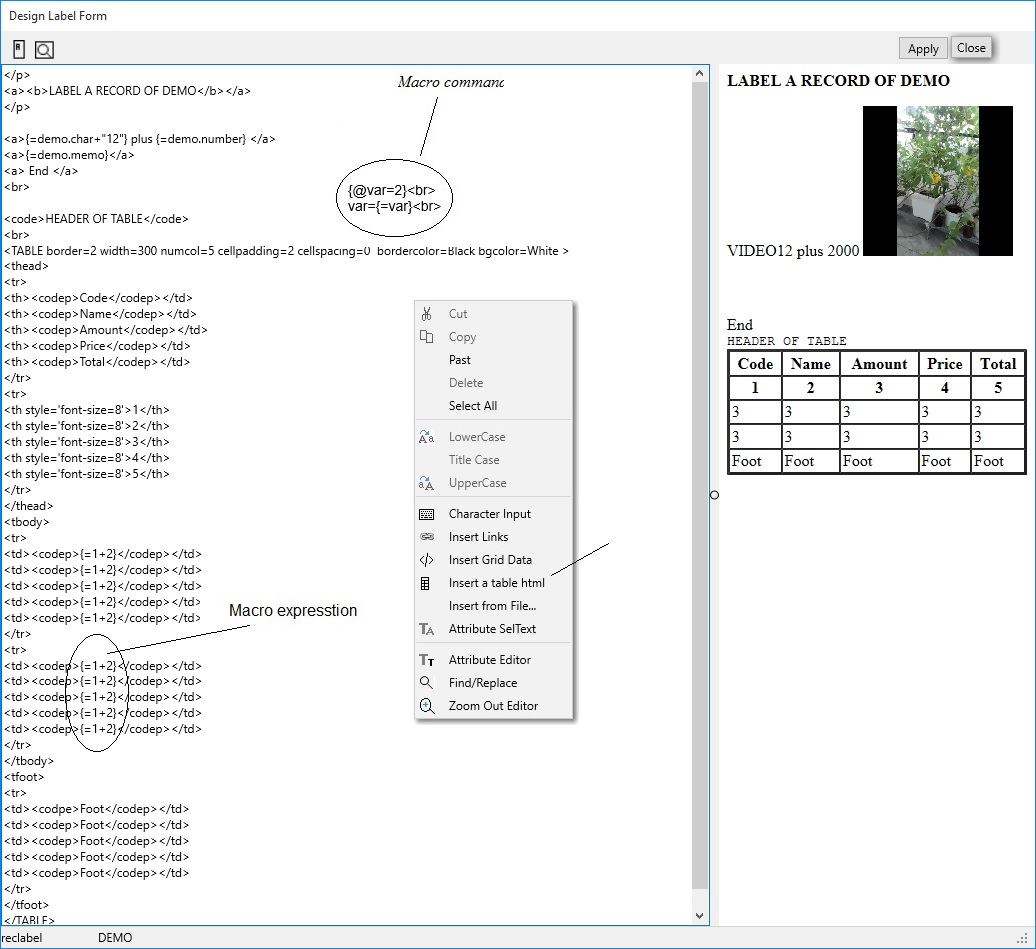
Description
Return max value from expression array
Suntax
MAX(Exp1, Exp2 {,Expt3 ...})
Example
? max(ctod('30/12/2018'),DATE())
30/12/2018
? max(30,31,32)
32.00
? max('a','abc')
a
? max('a','ABC')
a
Description
Returns the largest signed value in an array.
MaxValue returns the largest signed value in the Field of Table. The Number Row gives the index of the last element of the array - Row Count (one less than the number of elements).
It is financial function.
Suntax
MAXV(alias,field,number row)
Example
? open(1,'user\finance','finance')
Input : 5,2 ,3 ,9 ,1 ,8 in field 2, then:
? maxv('finance',2,6)
9
Description
Matrix functions
Suntax
MATRIX(ExpC,alias1)
ExpC - Function Name - DETERM/TRANSPOSE/MIN/MAX/CROSS/SUB/EVEN/SUM/MULT/COEF
MATRIX(ExpC,alias1,alias2)
ExpC - INVERSE/TRIU/TRIL
MATRIX(ExpC,alias1,alias2,alias3)
- Operation on two matrix worktab1, worktab2, result in worktab3
ExpC - */+/- Operation.
- alias is worktab number.
- alias is alias name worktab.
Example
? open(1,'user\matrix','matrix')
? matrix('DETERM','matrix')
151
? matrix('TRANSPOSE',1)
1
? matrix('MIN',1)
0
? matrix('MAX',1)
10
? matrix('CROSS',1)
11
? matrix('SUB',1)
20
? matrix('EVEN',1)
5
? matrix('SUM',1)
53
? matrix('MULT',1)
0
? matrix('COEF',1,3)
1
Where 3 is coef
Operation on worktab1 and store into worktab2
? open(2,'user\matrix2','matrix2')
? worktab(1)
? matrix('INVERSE',1,2)
1 is OK
? matrix('TRIU',1,2)
1
? matrix('TRIL',1,2)
1
Operation on worktab1 and worktab2 and store into worktab3
? open(3,'user\matrix3','matrix3')
? worktab(1)
? matrix('+',1,2,3)
? matrix('-',1,2,3)
? matrix('*',1,2,3)
Description
Returns the average of all values in a field.
Mean calculates the arithmetic average of all the values in the Data array parameter.
number row parameter gives the index of the last element of the array (one less than the number of elements).
It is financial function.
Suntax
MEAN(field,number row)
Example
? open(1,'user\finance','finance')
Input : 1,2 ,3 ,4 ,5 ,6 in field 2, then:
? mean('finance',2,6)
3.5
Description
Returns the median of the given numbers. The median is the number in the middle of a set of numbers; that is, half the numbers have values that are greater than the median, and half have values that are less.
It is financial function.
Suntax
MEDIAN(field,number row)
Example
? open(1,'user\finance','finance')
Input : 1,2 ,3 ,4 ,5 ,6 in field 2, then:
? median('finance',2,6)
4
Description
Returns the millisecond of the second represented of a day. It using on server.
It is dateTime function.
Suntax
MILLISECOND()
Example
? millisecond()
504994
Description
Return min value from expression array.
Suntax
MIN(Exp, Exp {, Exp ...})
Example
? min(ctod('30/12/2018'),ctod('31/12/2018'))
31/12/2018
? min(30,31,32)
30.00
? min('a','abc')
a
? min('a','ABC')
ABC
Description
Returns smallest signed value in an array.
MinValue returns the smallest signed value in the Field data Table. The Data_Size parameter specifies the index of the last element in the array (one less than the total number of elements).
It is financial function.
Suntax
MINV(alias,field,number row)
Example
? open(1,'user\finance','finance')
Input : 5,2 ,3 ,9 ,1 ,8 in field 2, then:
? minv('finance',2,6)
1
Description
Return the remainder after number is divided by divisor.
Suntax
MOD(x,y)
x number to find remainder.
y number which you want to divide number.
mod(n,d) = n - d*int(n/d)
Example
? mod(2019,4)
3
? mod(1,4)
1
Description
Returns the month of the year represented Date value.
It is dateTime function.
Suntax
MONTH(ExpD)
Example
? month(ctod('05/06/2019'))
5
Description
Most freq in field of table
It is financial function.
Suntax
MOSTFREQ(alias,field,number row)
Example
? open(1,'user\matrix','matrix')
? mostfreq('matrix',2,4)
1
Description
Multinomial a field of table.
Suntax
MULTINOM(alias,field,number row)
Example
? open(1,'user\matrix','matrix')
? multinom('matrix',2,4)
9240
Description
Returns the Euclidean 'L-2' norm.
Norm returns the Euclidean 'L-2' norm for the values in the Data array. The 'L-2' norm is the square root of the sum of squares.
Note: Data is an array of values, and row_Size is the index of the last value in the array (one less than the number of values).
It is financial function.
Suntax
NORM(alias,field,number row)
Example
? open(1,'user\finance','finance')
Input : 5,2 ,3 ,9 ,1 ,8 in field 2, then:
? norm('finance',2,6)
13.56
Description
Returns the number of payment periods for an investment.
NumberOfPeriods computes the number of payment periods required for an investment of PresentValue to reach a value of FutureValue, while making regular payments of Payment and accruing interest at the rate of Rate per compounding period. PaymentTime indicates whether the cash flows occur at the beginning or end of the period.
It is financial function.
Suntax
NPER(Rate,Payment,PresentValue,FutureValue,PaymentTime)
Example
? nper(0.12/12,-100,-1000,10000,0)
86.13
Description
Calculates the current value from an array of estimated cash flow values.
NetPresentValue calculates the current value of an array of estimated cash flow values, discounted at the given interest rate of Rate.
Data Table is the array of estimated cash flow values. Size of Table is the index of the last element in that array (one less than the number of elements).
PaymentTime indicates whether the cash flows occur at the beginning or end of the period.
NetPresentValue helps determine how much an investment is currently worth, based on expected earnings, although its accuracy depends on the accuracy of the cash flows in the array.
It is financial function.
Suntax
NPV(alias,Rate,field1,field2,number row)
Example
? open(1,'user\finance','finance')
Input : 5,2 ,3 ,9 ,1 ,8 in field 2
Input : 4,6 ,5 ,11 ,7 ,5 in field 3, then:
? npv('finance',0.8,2,3,6)
7.33
Description
Convert Octan to number
Suntax
OCTAL(ExpC,ExpN1,ExpN2)
Example
? octal('125',10,10)
85
? octal('125',2,10)
0001010101
? octal('125',16,10)
0x0000000055
OPEN(x,y)
OPEN(x)
Description
- Open dataset name y in worktab x with alias z
- And run Script between tag <head> ... </head>
- Note, don't used INDEX() function when modify structure script of any project.
- Is file name x open on other worktable.
It is database function.
* Note, not suport from remote.
Suntax
OPEN(ExpN,ExpC1,ExpC2)
ExpN - number worktab
ExpC1 - file name of table
ExpC2 - alias. If alias is blank alias is filename of table
OPEN(ExpN,ExpC)
ExpN - number worktab
ExpC - file name of table. When ALIAS is filename of table.
OPEN(ExpC) - Auto open file name ExpC in any first empty worktab. If all worktab used it opened worktab 1.
ExpC - is a file name.
Example
? open(1,"user\demo","demo")
.T.
This is open file demo on worktab 1
? open(1,"user\demo.cdf"," ")
.T.
This is open file demo on worktab 1 with alias DEMO
This is open file demo on worktab 1
? open(1,"user\demo.cdf")
.T.
This is open file demo on worktab 1 with alias DEMO
? open("user\demo")
.T.
This is auto open file demo on worktab 1 with alias DEMO.If worktab 1 has open other file. Worktab is 2.You shoud use this open(x).
Importan. Example, if you open a dataset DEMO in worktab 2 and open a child dataset CHART (by run script in DEMO) in worktab 2.When it show error message:
B: Cannot perform this operation on a closed dataset
Mother and child don't share a worktab.
Description
Center-aligns a 0-based string into a fixed length a character.
It is string function.
Suntax
PADC(ExpC,ExpN,Character)
Example
? padc("title",40,'=')
=================title==================
Description
Left-aligns a 0-based string into a fixed length a character.
It is string function.
Suntax
PADL(ExpC,ExpN,Character)
Example
? padr("title",40,'=')
title===================================
Description
Rigth-aligns a 0-based string into a fixed length a character.
It is string function.
Suntax
PADR(ExpC,ExpN,Character)
Example
? padr("title",40,'=')
===================================title
Description
Return path of opening table in worktab x.
It is database function.
Suntax
PATH(alias)
Example
? open(1,'user\demo','demo')
? path(1)
...user\demo.xml
Description
Return common constants of pi
Use Pi code to represent the mathematical value pi, the ratio of a circle's circumference to its diameter. Pi is approximated as 3.14159
Suntax
PI()
Example
? PI()
3.14
Description
Calculates a fully amortized payment.
Payment calculates the fully amortized payment of borrowing PresentValue at Rate percent per period over NPeriods. It assumes that interest is paid at the end of each period.
FutureValue is the value that the investment will reach at some point. PaymentTime indicates whether the cash flows occur at the beginning or end of the period.
It is financial function.
Suntax
PMT(Rate,NPeriods,PresentValue,FutureValue,PaymentTime)
Example
? pmt(0.08/12,10,10000,0,1)
-8.33
Description
Evaluates a uniform polynomial of one variable at the value x.
Call Poly to evaluate the polynomial represented by the Coefficients parameter at the point where the variable equals the value of the X parameter. The coefficients are ordered in increasing powers of x:
Coefficients[0] + Coefficients[1]*x + ... + Coefficients[N]*(x^N)
It is financial function.
Suntax
POLYV(alias,x,field,number row)
Example
? open(1,'user\finance','finance')
Input : 5,2 ,3 ,9 ,1 ,8 in field 2, then:
? polyv('finance',1,2,6)
28
Description
Returns the principal amount from a full payment.
PeriodPayment gives the part of the payment that is principal. The InterestPayment function gives the part of the payment that is interest.
The Rate parameter is the interest rate. Period is the number of periods into the loan for which the principal is desired, and NPeriods is the number of periods of the loan. FutureValue is the value the investment will reach at some point. PaymentTime indicates whether the cash flows occur at the beginning or end of the period.
It is financial function.
Suntax
PPMT(Rate, Period, NPeriods,PresentValue,FutureValue,PaymentTime)
Example
? ppmt(0.10/12,1,2*12,2000,0,1)
-6.15
Description
Return program dept level when program running. It is number.
Suntax
PRGDEPT()
Example
? prgdept()
2
Description
Product matrix
Suntax
PRODUCT(alias,field,number record)
Example
? open(1,'user\matrix','matrix')
? product('matrix',1,4)
Description
Return program name is running.
* Note, not suport from remote.
Suntax
PROGRAM()
Example
? program()
demo
Description
Return proper character string is full name.
It is string function.
Suntax
PROPER(ExpC)
Example
? proper('VISUAL VX+')
Visual Vx+
Description
Calculates the present value of an investment.
PresentValue calculates the present value of an investment where Payment is received for NPeriods and is discounted at the rate of Rate per period. FutureValue is the value the investment may reach at some point. PaymentTime indicates whether the cash flows occur at the beginning or end of the period.
It is financial function.
Suntax
PV(Rate,NPeriods,Payment,FutureValue,PaymentTime)
Example
? pv(0.08/12,12*20, 500,0,0)
-545514.8
Description
Returns a random integer from a specified range. or
Random number generator.
RandomRange returns a random integer from the range that extends between AFrom and ATo (non-inclusive). RandomRange can handle negative ranges (where AFrom is greater than ATo).
To initialize the random number generator, add a single call Randomize or assign a value to the RandSeed variable before making any calls to RandomRange.
Suntax
RAND()RAND(ExpN1,ExpN2)
Example
? rand()
0.34
? rand(120)
0.43
? rand(120,34)
80
Description
Returns the index at which a specified x substring begins, from right position and z times..
It is string function.
Suntax
RAT(ExpC1,ExpC2,ExpN)
Example
? rat('v','visual vx')
8
? rat('v','visual vx',2)
1
Description
Returns the interest rate required to increase PresentValue to FutureValue.
InterestRate calculates the interest rate required in order for an investment of PresentValue, with periodic payments of Payment, to be worth FutureValue within NPeriods compounding periods. If NPeriods represents years, an annual interest rate results; if NPeriods represents months, a monthly interest rate results, and so on. The PaymentTime parameter indicates whether the cash flows occur at the beginning or end of the period.
It is financial function.
Suntax
RATE(NPeriods,Payment,PresentValue,FutureValue,PaymentTime)
Example
? rate(4*12,-200,8000,0,0)
0.02
Description
Return number of record in table
It is database function.
Suntax
RECCOUNT(alias)
Example
? open(1,"user\demo","demo")
? reccount('demo')
10
Description
- Return current record in worktab alias
- Move current record in table x to position y.
* Importand, RecNo is changered when you open INDEX.
It is database function.
Suntax
- RECNO(alias)
- RECNO(alias,Exp)
Exp = 'bottom' go to bottom of file
Exp = 'top' go to top of file
Exp = number go to number record.
Example
? open(1,"user\demo","demo")
? recno('demo')
1
? recno('demo',3)
3
? recno('demo','top')
1
? recno(1,'bottom')
5
See more: LOCATE(),SKIP(),SEEK(), HTML('<getrecno alias= />;>')
Description
Return size a record of table.
It is database function.
Suntax
RECSIZE(alias)
Example
? open(1,'user\demo','demo')
? recsize('demo')
118
Description
Relation on index field y , worktab x to worktab z
It is database function.
Suntax
RELATION(alias1,ExpC,alias2)
Alias1 = Master table
ExpC = Field name.
When ExpC = "" is close relation.
Alias2 = Detail table
* Note, In Master table and Detail table exists same field name.
Same field name in detail table need indexed.
Example
? open(1,"user\demo","demo")
? open(2,"user\demo1","demo1")
? index(2,"char","char"," ")
? relation('demo',"char",'demo1')
To close relation two table, you can:
? relation('demo',"",'demo1')
Description
Remove all variables or only a name variable.
* Note, not suport from remote.
Suntax
RELEASE(nameVAR)
Example
? release()
.T.
Release all memory variables.
? release('namevar')
.T.
Release only a variable, has a name: nameVAR.
See RESTORE(), SAVE()
Description
Replace field y of table x with z value in current record.
It is database function.
Suntax
REPLACE(alias,field,Exp)
REPLACE(alias,field,Exp,ExpC,Recno)
Where:
Exp: Expression
ExpC: Condision Expression. When ExpC is '' will replaced all record in table.
Example
? open(1,'user\demo','demo')
replace field memo of table demo with "Hello" in current record.
? replace('demo','memo','="Hello" ')
or
or
Relace field NOTE with Order record of Alias DEMO, start at 1 recno in condition all record, it can run inside remote client:.
? replace('demo','note','=recno("demo") ','=recno(1)>0)',1)
or
? replace('demo','note','=recno("demo") ','',1)
* When choose Not Write in server, Replace function return 0.
? html('<replace alias=demo;fieldname=memo;value?="Hello";/>')
? html('<replace alias=demo;fieldname=memo;value=Hello;/>')
Or
In webpage you put string :
<replace alias=demo;fieldname=memo;value=Hello;/>
or
<replace fieldname=demo.memo;value=Hello;/>
REPLACE(x,y)
Description
Replace many fields of table x with y Expression string tag
It is database function.
Suntax
REPLACE(alias,ExpTag)
Example
? open(1,'user\demo','demo')
replace Memo field of table demo with "Hello"
? replace('demo','<.memo>Hello</.memo>')
or
? html('<replace alias=demo;value=<.memo>Hello</.memo> ;/>')
In webpage you put string :
<replace alias=demo;value=<.memo>Hello</.memo> ;/>
Sumary: you have 2 methogs to send database into server.
- First methog is normally.
- Secord methog is using one string tag into server.
* Note, if in server setting Not write to response "Not permision write".
Description
Replace string with other string
It is string function.
Suntax
REPLACESTR(string1, string 2, all, case)
Example
? replacestr("This is table ","is","not",0,0)
Thnot is table
? replacestr("This is table ","is","not",1,0)
Thnot not table
Description
Return character string x replicate y times.
It is string function.
Suntax
REPLICATE(ExpC,ExpN)
Example
? replicate('vx',4)
vxvxvxvx
? REPORT(alias)
REPORT(x,y,z,w)
Description
REPORT(alias) - Return list of form report embed in database. Ordinary, remote client used get list report form of a table is openned on server.
It is a delimeted text, like: formreport1,formreport2...
REPORT(x,y,z,w) - Return report. It is a webpage.
It is database function.
Suntax
REPORT(alias,ExpC1,ExpC2,ExpN1,ExpN2)
ExpC1 - form report. It created on structure table demo. Every table have max 10 form. See create structure.
ExpC2 -Condition.
ExpN1 - Start position record.
ExpN2 - Response a page report (lines/page defined in monitoring dialog - default 10 line/page).
Because, big data many record, you need response a small webpage in avery times access to webserver.
Example
? open(1,'user\demo','demo')
To get list report name:
? report('demo')
demotable,simple
or inside remote client you get:
? html('
demotable,simple
To dislay report form:
? report(1,'demotable','= number>0',1)
Response first page.
? report(1,'demotable','= number>0',1,3)
Response 3th page from fisrt record.
? report(1,'demotable','="table & 2022"$"..."',1)
Response only records contain string "table" and "2022".
? report(1,'demotable','="xml | json"$"..."',1)
Response only records contain string "xml" or "json".
Html code:
? html('<report form=demotable;alias=demo;page=2;q?=number>0;>')
See more report form, created and used it
Description
Restore memory variable from file x.
* Note, not suport from remote.
Suntax
RESTORE(ExpC,Exp)
ExpC is File Name.
Example
? restore('memvar')
Restore and Addition variables from file memvar.var
? restore('memvar',0)
Release all memory variables created before, and then Restore variables from file memvar.var
See RELEASE(),SAVE()
Description
Substr character string n character from right position.
It is string function.
Suntax
RIGHT(ExpC,ExpN)
Example
? right('visual vx',4)
l vx
Description
Convert number to roman character
Suntax
ROMAN(ExpN)
Example
? roman(12)
XII
? roman(9)
IX
Description
Rounds a value to a specified digit or power of ten using "Banker's rounding".
Call RoundTo to round AValue to a specified power of ten.
AValue is the value to round.
x indicates the power of ten to which you want y rounded. It can be any value in the range from –20 through 20.
Suntax
ROUND(ExpN1,ExpN2)
Example
? round(1450.1256,2)
1500
? round(1450.1256,0)
1450.00
? round(1450.1256,-2)
1450.13
Description
Returns the square of the Pearson product moment correlation coefficient through data points in field1 x and field2 y.
It is financial function.
Suntax
RSQ(alias,field1,field2,number row)
Example
? open(1,'user\finance','finance')
Input : 2,3 ,9 ,1 ,8 ,7,5 in field 2
Input : 6,5 ,11 ,7 ,5 ,4,4 in field 3, then:
? rsq('finance',2,3,7)
0.06
Description
Converts radians x to cycles. It is Trigonometric function.
Use RadToCycle to convert angles measured in radians into cycles, where
cycles = radians/(2pi).
Suntax
RTOC(ExpN)
Example
? rtoc(10)
1.59
Description
Converts radians x to degrees. It is Trigonometric function.
Use RadToDeg to convert angles measured in radians to degrees, wheredegrees = radians(180/pi).
Suntax
RTOD(ExpN)
Example
? rtod(10)
572.96
Description
Converts radians x to grads. It is Trigonometric function.
Use RadToGrad to convert angles measured in radians to grads, wheregrads = radians(200/pi).
Suntax
RTOG(ExpN)
Example
? rtog(10)
636.62
Description
Returns a new charater string without right spaces.
It is string function.
Suntax
RTRIM(ExpC)
Example
? 'L'+rtrim(' today ')+'R'
L todayR
Description
Save all memory variable to file x. If it is not extension , it extension is .var
* Note, not suport from remote.
Suntax
SAVE(ExpC)
ExpC is File Name
Example
? save('memvar')
It save all memory variable to file memvar.var
* Note, Memo point variable not save to disk.
* Note, Memo point in Dimension variable auto change to Logic value when save to disk.
See RELEASE(),RESTORE()
SCRIPT(x,y,z)
Description
Run script. Script created in structure file table. It is small code html. It same like function STORE PROCEDURE.
It is very importand add for do program.
When you turn on webserver. It will run script scene, like:.
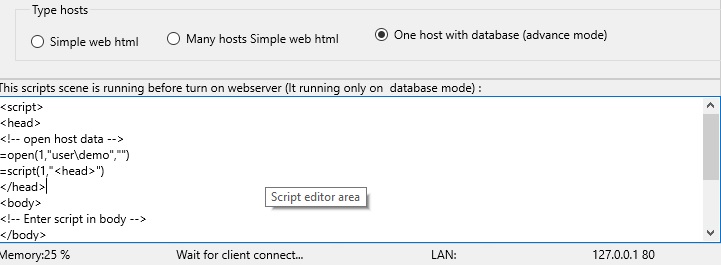
Suntax
SCRIPT(alias,ExpC1,ExpC2)
ExpC1 - this string tag: "<head>" or "<body>" or "<foot>"
ExpC2 - run a sub object in main string tag: <head> or <body> or <foot > . It code like:
<div id="ExpC2"> .... </div>
Example
? open(1,"user\demo","demo")
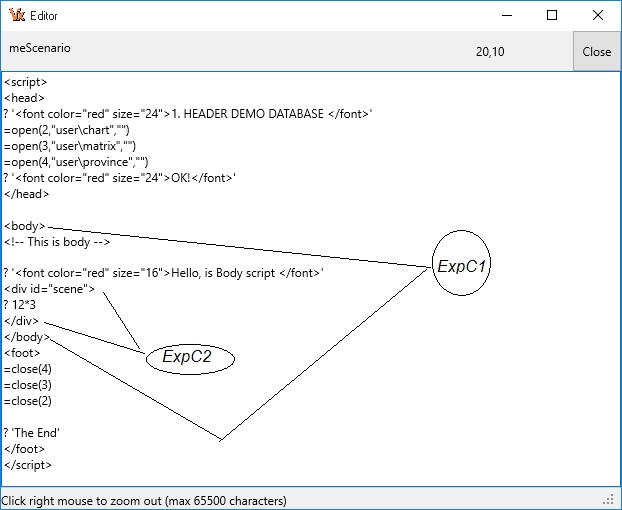
? script(1,"<body>")
Or
You can run html script command from remote, like:=html('
Example, if script code in DEMO:
<body >
? 'Body script'
<div id="subscene" >
? 12*3
</div >
</body >
password=username,adminpass setting in server.
When you type command line:
? script(1,"<body>","subscene")
36
Or
You can run html script command from remote, like:=html('
* Note, if in <div id="..." > </div> has other sub <div > </div>, it return at sub <div >.
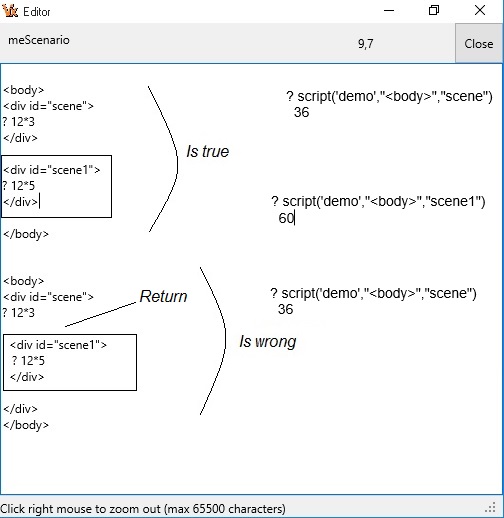
This script to open CHART,MATRIX,PROVINCE data table
? script(1,"<head>")
This script to close data table.
? script(1,"<foot>")
View: GETTAG() tag function
* Note, in current worktab, example 1, you cant write script code to open or close dataset in this current worktab.
Importan. Example, if you open a dataset DEMO in worktab 1 and open a child dataset CHART (by run script in DEMO) in worktab 1.When it show error message:
A: Cannot perform this operation on a closed dataset
Mother and child don't share a worktab.
Description
Seek on index field. Return number record (indexed) if find is true, otherwire return -1.
It is database function.
Suntax
SEEK(alias,ExpC)
Example
? open(1,"user\demo","demo")
.T.
? index(1,"char","char"," ")
.T.
? seek('demo','VIDEO')
8
See more: LOACTE(), RECNO(),SKIP()
Description
Calculates the secant of an angle. It is Trigonometric function.
Call SEC to obtain the secant of x, where x is an angle in radians. The secant is calculated using the formula 1 / Cos(x).
Note: Sec is identical to the Secant function.
Suntax
SEC(ExpN)
Example
? sec(12)
1.19
Description
Calculates the secant of an angle. It is Trigonometric function.
Call SECANT to obtain the secant of x, where x is an angle in radians. The secant is calculated using the formula 1 / Cos(x).
Suntax
SECANT(ExpN)
Example
? secant(0.2)
1.02
Description
Calculates the hyperbolic secant of an angle.
Call SECH to obtain the hyperbolic secant of x, where x is an angle in Radians.
Suntax
SECH(ExpN)
Example
? sech(2)
0.27
Description
Indicates whether a numeric value is positive, negative, or zero.
Use SIGN to test the sign of a numeric value.
Suntax
SIGN(ExpN)
Example
? sign(10)
1
? sign(-10)
-1
? sign(0)
0
Description
Returns the sine of the angle, in radians. It is Trigonometric function.
Sin function returns the sine of the argument.
x is a real-type expression. Sin returns the sine of the angle x, in radians.
Suntax
SIN(ExpN)
Example
? sin(0)
0.00
? sin(dtor(270))
-1.00
Description
Returns the hyperbolic sine of an angle. SINH calculates the hyperbolic sine of x.It is Trigonometric function.
Suntax
SINH(ExpN)
Example
? sinh(0)
0.00
? sinh(dtor(270))
55.65
Description
Returns the skewness of a distribution. Skewness characterizes the degree of asymmetry of a distribution around its mean.
Positive skewness indicates a distribution with an asymmetric tail extending toward more positive values.
Negative skewness indicates a distribution with an asymmetric tail extending toward more negative values.
It is financial function.
Suntax
SKEW(alias,field, number row)
Example
? open(1,'user\finance','finance')
Input :3, 4,5 ,2 ,3 ,4 ,5 ,6,4,7 in field 2, then:
? skew('finance',2,10)
0.3
Description
Move current record of table x record y.
It is database function.
Suntax
SKIP(alias,ExpN)
Example
Open 'user\demo' in worktab 1
? skip('demo',2)
2
See more: LOCATE(),RECNO(),SEEK()
Description
Returns the straight-line depreciation allowance of an asset.
SLNDepreciation calculates the straight-line depreciation allowance for an asset over one period of its life.
The function divides the Cost minus the Salvage by the number of years of useful Life of the asset.
Cost is the amount initially paid for the asset. Salvage is the value of the asset at the end of its useful life.
To compute accelerated depreciation (allowing higher depreciation values in the first years of the assets life), use the SYDDepreciation function.
It is financial function.
Suntax
SLN(cost,salvage,life)
Example
? sln(30000,7500,10)
2250
Description
Returns the slope of the linear regression line through data points in Field1 and Field2.
The slope is the vertical distance divided by the horizontal distance between any two points on the line, which is the rate of change along the regression line.
It is financial function.
Suntax
SLOPE(alias,field1,field2,number row)
field1 is an array or cell range of numeric dependent data points.
field2 is the set of independent data points.
Example
? open(1,'user\finance','finance')
Input : 2,3 ,9 ,1 ,8 ,7 ,5 in field 2
Input : 6,5 ,11 ,7 ,5 ,4 ,4 in field 3, then:
? slope('finance',2,3,7)
0.3
Description
Sort array or table
It is database function.
Suntax
SORT(alias,ExpN1,ExpN2,ExpN3)
ExpN1 - 0 ASECDING, 1 DESCEDING
ExpN2 - fieldnumber sort
ExpN3 - number record
Example
Open 'user\demo' in worktab 1
? open(1,'user\demo','demo')
.T.
? sort('demo',0,5,5)
* Note, only field 5 sorted, other field not changed. To sort table data, you need use function INDEX().
Description
Return x character space.
Return x web character space.
It is string function.
Suntax
SPACE(ExpN)
SPACE(ExpN,0)
Example
? 'Visual'+space(2)+'VX+'
Visual VX+
For webbrowser you need use SPACE(n,0):
? 'Visual'+space(2,0)+'VX+'
Visual VX+
* Note, in web space character is symbol .
You can use function REPLICATE(' ',ExpN).? 'Visual'+replicate(' ',2)+'VX+'
Visual VX+
Description
Returns the square root of x.
Suntax
SQRT(ExpN)
Example
? sqrt(4)
2
Description
Returns the sample standard deviation for elements in an array.
StdDev calculates the sample standard deviation (the square root of the sample variance) of all values in the Data array parameter.number row indicates the index of the last element in the array (one less than the number of elements).
It is financial function.
Suntax
STDEV(alias,field,number row)
Example
? open(1,'user\finance','finance')
Input : 1345,1301 ,1368 ,1322 ,1310 ,1370 ,1318,1350,1303,1299 in field 2, then:
? stdev('finance',2,10)
27.46
Description
Calculates standard deviation based on the entire population given as arguments.
The standard deviation is a measure of how widely values are dispersed from the average value (the mean).
PopnStdDev calculates the population standard deviation (the square root of the population variance) of all values in the Data array parameter.number row parameter indicates the index of the last element in Data (one less than the number of data points).
This function is used in some business and financial calculations.
It is financial function.
Suntax
STDEVP(alias,field,number row)
Example
? open(1,'user\finance','finance')
Input : 1345,1301 ,1368 ,1322 ,1310 ,1370 ,1318,1350,1303,1299 in field 2, then:
? stdevp('finance',2,10)
26.05
Description
Returns standard error. It is financial function.
Suntax
STEPX(alias,field1,field2,number row)
Field1 is the first cell range of integers.
Field2 is the second cell range of integers.
Example
Open 'user\finance' table in 1 tab. After that :
Input in field Year1, from 1 record to 5 record: 6 , 7 ,9 , 15 , 21
Input in field Year2, from 1 record to 5 record: 20 , 26 , 31 , 38 , 40
? stepx('finance',2,3,5)
1.78
Description
Convert number to character string.
It is string function.
Suntax
STR(ExpN)
Example
? str(123.45)
123.45
STR(format,x)
where:
x - is number.
format:
Space character or #0.00 is settings default
#,##0.00
#,##0.00_(#,##0.00)
#,##0.00 CR_#,##0.00 DB
$#,##0.00_($#,##0.00)
#,##0.00__Zero
0.000E+00
#.###E-0
See same function TRANSFORM(x,format)
Example
? str('#,##0.00_(#,##0.00) ',1234567.456)
1.234.567.46
? transform(1234567.456,'#,##0.00_(#,##0.00) ')
1.234.567.46
STR(x,len,dec)
Example
? str(123.456,3,2)
123.46
Description
Insert w character string into x character string begin z position and z times.
It is string function.
Suntax
STUFF(ExpC1,ExpN1,ExpN2,ExpC2)
Example
? stuff('today is nine',3,3,'DAY')
toDAY is nine
Description
Returns the substring starting at the position y and optionally ending at the position y + z (Length),if specified, from this 0-based string.
It is string function.
Suntax
SUBSTR(ExpC,ExpN,ExpN)
Example
? substr('hello',2,3)
ell
SUM(x,y,z,w)
SUM(x,y,z,w,v)Sum(_arX,rowARR)sumCDF(x,y,z,w,_func::SUMf);sumTagCDF(x,y,z,w,v)
Description
SUM(alias,fieldnum,numrow) Returns the sum of fieldnumber, start first to numrow record in a table.
It is financy function.
SUM(alias,fieldname,exp,namevar). Returns the sum for exp (condision expression) in the fieldname of table. Fieldname is number type.
It database function. It return sum value. It created new varialbe NAMEVAR.
* Note, If fieldname has a expression formula. It return value 0.
* Note, namevar = blank . It not create namevar.
SUM(alias,y,z,w,v). Returns the sum of values in
Suntax
SUM(alias,field,number row) is financy function.
SUM(alias,fieldname,exp,namevar) is database function.
SUM(alias,Field,Exp,opentab,closetag) is database function.
Example
? open(1,'user\demo','demo')
? sum('demo',5,'=number>=0','')
422
? sum('demo',5,4)
...
? sum('demo','memo','','','')
Description
Returns the sum of the squared values from a data array.
SumOfSquares returns the sum of the squares of the Data values: Data[0]^2 + Data[1]^2 + Data[2]^2... ,
the Number row parameter specifies the index of the last value in Data (one less than the number of values).
It is financial function.
Suntax
SUMSQ(alias,field,number row)
Example
? open(1,'user\finance','finance')
Input : 4,5 ,8 ,7 ,11 ,4 ,3 in field 2, then:
? sumsq('finance',2,7)
300
Description
System function.
It is system function. System function can control Webserver from Remote.
Suntax
SYS(x,y)
- Parameter x is String
- Parameter y is Password in Server. VX+ created 3 level password :
+ Level 0 is Leader Password.
+ Level 1 is Admin Password.
+ Level 2 is Customer Password.
Examples
- information
? sys("information","")
like: author,download,visit,online,max size file upload...
- Display system information.
* Note, you need input Username and Admin Password. Like : Admin Name, Admin Password
suntax:
? sys(String,Admin Password)
Examples:
? sys("config","admin,123")
- config -> Display file vx.ini in webserver.
? sys("message","admin,123")
- message -> Display messages in webserver.
- login -> List address IP login to server.
- forum -> List message of forum.
- denied -> Show list IP denied login to server.
- memory -> Availble memory in server.
- screen -> Show Monitoring Screen of Webserver VX+.
Change value setting in server:
* Note, you need input Admin Password.
Examples:
? sys("password:","admin,123")
passdomain: new password, change passowrd when access to domain.
? sys("username:","admin,123")
username:new name, change user name of server.
? sys("security:","admin,123")
security:on/off , turn On/Off security dialog on remote with password when login.
- waitprocess: -> Turn On/Off wait processing.
- message: -> Turn On/Off message.
- denied: -> Turn On/Off denied login.
- sizeupload: -> Setting size a file to upload.
- bytedenied: -> Setting number byte for denied.
- recordreport: -> Setting number record of a report.
- byteforum: -> Setting volumn byte used in forum.
- rowmessage: -> Setting number row in message.
- linelog: -> Setting number line in login message.
Change type file in server:
? sys("uploadfile:","admin,123") - Change type upload file.
? sys("downnfloadile:","admin,123") - Change type download file.
List customer database:
? sys("label:","admin,123") - Display a customer in server.
? sys("report:","admin,123") - List all customer.
? sys("fieldcust:","admin,123") - Replace a field customer database.
Get field name of system file (vx.ini) in server:
? sys("config:server name","admin,123") - Get server name.
? sys("server:Size Upload","admin,123") - Get size upload file in server.
? sys("stored:","admin,123") -
? sys("login:Type Upload","admin,123") - Type of file upload to server.
? sys("host:Visits","admin,123") - Total visits.
Example
? sys("author","")
Copyright @ :Tran Van Thang, VietNam
? sys("download","")
1
download times in server is 1.
? sys("visit","")
3
visit times in server is 3.
? sys("online","")
2
customers on line is 2.
Function sys for administrater:username,admin password
? sys('config','admin,123')
admin is admin password. It can changed
It return settings config VX+ in server.
? sys('message','admin,123')
admin password.
It return settings config VX+ in server.
See control panel remote to server...
Description
Calculates depreciation for an asset.
SYDDepreciation (for "sum-of-years-digits depreciation") calculates depreciation amounts for an asset using an accelerated depreciation method. This allows for higher depreciation in the earlier years of an asset's life.
Cost is the initial cost of the asset. Salvage is the value of the asset at the end of its life expectancy. Life is the length of the asset's life expectancy. Period is the period for which to calculate the depreciation.
It is financial function.
Suntax
SYD(Cost,Salvage,Life,Period)
Example
? syd(30000,7500,10,10)
409.09
Description
Returns the tangent of x. It is Trigonometric function.
TAN returns the tangent of x, expressed in radians. Tan(x) = Sin(x) / Cos(x).
Suntax
TAN(ExpN)
Example
? tan(0)
0
? tan(PI())
0
? tan(PI()/4)
1.00
Description
Returns the hyperbolic tangent of x. It is Trigonometric function.
TANH calculates the hyperbolic tangent of x.
Suntax
TANH(ExpN)
Example
? tanh(0)
0
? tanh(PI())
1
? tanh(PI()/4)
0.66
? TANH(PI()/4)
1.00
Description
Total field number of table x, on field y, condition z, save to file w.
File w has normal structure.
* Note, if fieldnumber has expression formular will calculate a value for total.
It is database function.
Suntax
TOTAL(alias,ExpC1,ExpC2,ExpC3)
ExpC1 - on indexed field name.
ExpC2 - Condition.
ExpC3 - filename to save
.
Example
? open(1,'user\demo','demo')
? index(1,"char","char;number"," ")
? total(1,'=char+number','','example')
This is wrong, because field CHAR is character, field NUMBER is number, it not same type, it can't plus.
* Note, when you total on many field, they need has same type.
? index(1,"idxnum","number"," ")
? total(1,'=number','','example')
This is true.
or
? open(1,'user\salary','demo')
? index('salary',"idxname","id_dep;id_per"," ")
? total('salary','=id_dep+id_per','','example')
This is total on 2 field character by key: ID_DEP;ID_PER
* Note, total "example" file in same directory of "salary" data file.
Description
Returns a new charater string after transform mask. It used to design report form or label form.
Suntax
TRANSFORM(ExpC1,ExpC2)
ExpC1 - is variable (number, logic, date, character)
ExpC2 - is pattern mask.
If ExpC1 is Logic, ExpC2 has format mask:
English: [True] (False) is settings default
VietNam: [Đúng] (Sai)
Rusian : [Истинным] (Ложным)
If ExpC1 is Number, ExpC2 has format mask:
Space character or #0.00 is settings default
#,##0.00
#,##0.00_(#,##0.00)
#,##0.00 CR_#,##0.00 DB
$#,##0.00_($#,##0.00)
#,##0.00__Zero
0.000E+00
#.###E-0
If ExpC1 is Date, ExpC2 has format mask:
m/d/yyyy
m/dd/yyyy
m/ddd/yyyy
m/dddd/yyyy
m/dddddd/yyyy
mm/dd/yyyy
mm/dd/yy
mmm/dd/yyyy
mmmm/dd/yyyy
dd/mm/yyyy is settings default
dd/mm/yyyy hh:nn:ss AM/PM
dd/mmm/yy
yyyy/mm/dd
If ExpC1 is Character, ExpC2 has format mask:
UpperCase
LowerCase
Proper
Trim
TrimLeft
TrimRight
US
FR
! If a ! character appears in the mask, optional characters are represented in the returned string as uppercase character.
A The A character requires an alphanumeric character only in this position. This is A-Z, a-z, 0-9.
X The X character permits a any character in this position.
9 The 9 character permits a numeric character in this position. This is 0-9.
# The # character permits a numeric character or a plus or minus sign in this position in this position. This is +, - , 0-9.
Example
? open(1,'user\ftype','ftype')
Logic Type
If record field LOGIC is True:
? transform(Logic,"[True] (False)")
True
? transform(Logic,"[Đúng] (sai)")
Đúng
? transform(Logic,"[Истинным] (Ложным) ")
Правда
If record field LOGIC is false:
? transform(Logic,"[True] (False)")
False
? transform(Logic,"[Đúng] (Sai)")
Sai
? transform(Logic,"[Истинным] (Ложным) ")
Ложная
Number Type
? transform(1234.56,"#,##0.00")
1234.56
Date Type
? transform(CTOD("02/03/2022"),"m/dddddd/yyyy")
2/Thursday, February 3, 2022/2022
Character Type
? transform("To day is sunday","UpperCase")
TO DAY IS SUNDAY
? transform("To day is sunday","LowerCase")
to day is sunday
? transform("To day is sunday","Proper")
To Day Is Sunday
Change number US to FR:
? transform("1,234.56","FR")
1.234,56
Change number FR to US:
? transform("1.234,56","FR")
1,234.56
Telephone Code:
? transform("012345678","9999.99.999")
0123.45.678
Description
Returns a new charater string without right spaces and left spaces.
It is string function.
Suntax
TRIM(ExpC)
Example
? 'L'+trim(' today ')+'R'
LtodayR
Description
Converts a character string into Uppercase.
It is string function.
Suntax
UPPER(ExpC)
Example
? upper('visual vx+')
VISUAL VX+
? upper('License')
LICENSE
Description
Converts a character string into a number.
Suntax
VAL(ExpC)
VAL(ExpC,ExpC)
Example
? VAL('12')
12
? VAL(' 12 ')
12
? VAL('abc')
0
? VAL('12abc')
0
* Converts a character string with with thousand separater or space into a number.
VAL(ExpC, ExpC)
ExpC = any value.
Otherwise it is VAL(ExpC)
Example
? VAL('12',1)
12
With Thousand Separater and Decimal point (.) is US,
US - number is US format (1,234.56)
? VAL(' 1,234.56',"")
1234.56
If number is FR format (1.234,56) settings in window platform.
? VAL(' 1.234,56',"")
1234.56
? VAL(' 1234.56',"")
1234.56
? VAL(' 1234.56')
1234.56
Description
VAR(alias,x,y)
Returns the statistical variance from an array of values.
TotalVariance returns the sum of the squares of the difference between each Data value and the mean of the data values.
Total Variance: SUM(i=1,N)[(X(i) - Mean)**2]
It is financial function.
VAR(String) - Runtime a VX command.
This functin used design report or label.
VAR() - Return all variable on server. Variables has created at runtime.
Suntax
VAR(alias,field,number row)
VAR(String)
Example
? open(1,'user\finance','finance')
Input : 4,5 ,8 ,7 ,11 ,4 ,3 in field 2, then:
? var('finance'2,6)
37.5
VAR('ABC=12')
will asigned memvar ABC by value 12
VAR('? 2*3')
will return value 6
In server you create 2 variables.
Hello='Hi'
today='sunday'
When, it return:
VAR()
HELLO,TODAY
or html code, it return:
? html('
HELLO,TODAY
Description
Calculates statistical sample variance from an array of data.
Variance calculates the sample variance of all values in the Data array parameter, using the n-1 method (unbiased).number row specifies the index of the last value in Data (on less than the number of data values).
It is financial function.
Suntax
VARA(alias,field,number row)
Example
? open(1,'user\finance','finance')
Input : 4,5 ,8 ,7 ,11 ,4 ,3 in field 2, then:
? vara('finance',2,6)
7.5
Description
Calculates the population variance.
PopnVariance calculates the population variance of all values in the Data array parameter, using the n method (biased): TotalVariance / n.number row parameter is the index of the last value in the Data array (one less than the number of data items).
It is financial function.
Suntax
VARP(alias,field,number row)
Example
? open(1,'user\finance','finance')
Input : 4,5 ,8 ,7 ,11 ,4 ,3 in field 2, then:
? varp('finance',2,6)
6.25
Description
Return version VX+. It is character value.
Suntax
VERSION()
Example
? version()
Description
Returns the year represented by a x value. It is number value.
It is dateTime function.
Suntax
YEAR(ExpD)
Example
? year(ctod('06/06/2019'))
2019
Description
WorkTable is manu dataset in VX+
WorkTable has 64 dataset in VX+ 64 bit (It call WorkTab).
It is database function.
Suntax
WORKTAB() return number worktab, it is fisrt free worktab (not table open in this worktab). If all worktab used it return 1.
WORKTAB(0) return max worktab in VX+.
Example
? 'current worktab is : '+worktab()
current free worktab is : 2
You cant use to auto open datatab:
=open(worktab(),'exanple')
same:
=open(2,'exanple')
? worktab(0)
64